Introducing the Instapaper Firefox Extension
Today we’re launching an official Instapaper extension for Firefox!
We’ve been getting a lot of requests from Firefox users to build an extension to match the ones we offer for Chrome, Opera and Safari. Now, we’re happy to roll out the same great saving features for Firefox.
To install the new Firefox extension, open www.instapaper.com/save on Firefox or go to Mozilla’s [Add-on page for Instapaper.
](https://addons.mozilla.org/en-US/firefox/addon/instapaper-official/)Like our other browser extensions, when you find an article or video you want to save, just tap or click once to save it to Instapaper. Other convenient features include:
A keyboard shortcut: A Ctrl+shift+S keyboard shortcut to save the article you’re currently viewing.
A right-click menu option: To save the current page–or any link on the current page–we added an “Instapaper” option to the right-click menu.
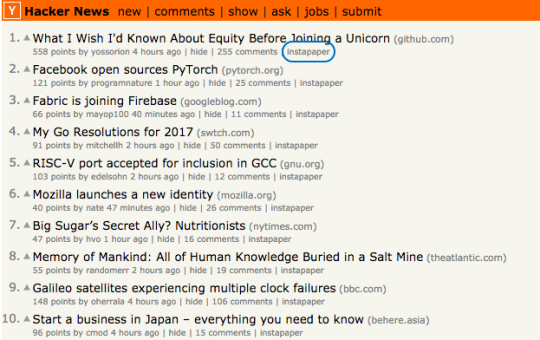
More Instapaper save buttons: Now you can “Save to Instapaper” directly from Twitter and Hacker News. Alongside each tweet containing a URL or a Hacker News post, you’ll now see an inline Instapaper save button.
Saving directly to folders: Once your save is confirmed, click the folder icon on the save overlay to direct the article right into one of your folders.
Toggle options: The keyboard shortcut and inline saving options can be toggled on/off.

If you’ve got any questions or feedback, just let us know via support@help.instapaper.com or @InstapaperHelp on Twitter.
– Instapaper Team