On Folders
Hi, this is Grant. I’ve been working on the Instapaper website redesign. An overview of our thoughts behind the new design is coming, but in the meantime I’d love to get more of your feedback on what has been one of the trickiest aspects of it: Folders.
Instapaper Folders are set up so that an article can only live in one place at a time. This means that adding an article to one folder takes it out of your main Unread feed (which is actually the Read Later folder), and archiving that article removes it from the folder. This can be confusing if you’re coming to them from a different model (such as an RSS reader), where articles can live in multiple places.
If you’re an Instapaper user who doesn’t use folders and this post is already stressing you out, don’t worry. One of our goals is to make sure the 80% of our users who don’t use folders never have to think about them. There are users who find folders essential to Instapaper though, and we’re determined that they get the most out of them.
If you’ve been stopping by the beta regularly, you’ve seen the folder location shift around a bit as we look for the best solution. Today, we pushed an update where folders are revealed via a toggle button on the top Unread bar:
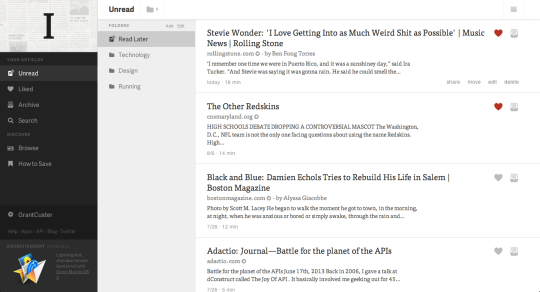
This option seems to me to best balance the needs of the non-folder and power folder user. It also takes better advantage of the horizontal space available. The tradeoff is in initial discoverability, as the toggle might not be noticeable on first glance.
We’d love to hear more about your folder use and whether this solutions fits with it. We know that besides organizing your reading into categories, some of you use folders to separate out media types or store articles for later sharing.
Let us know how you use folders, either in the comments below or at grant@betaworks.com.
-Grant