<?xml version="1.0" encoding="utf-8"?><feed xmlns="http://www.w3.org/2005/Atom" ><generator uri="https://jekyllrb.com/" version="3.10.0">Jekyll</generator><link href="/rss" rel="self" type="application/atom+xml" /><link href="/" rel="alternate" type="text/html" /><updated>2026-08-11T16:03:39+00:00</updated><id>/rss</id><title type="html">Instapaper Blog</title><subtitle>Product updates, company announcements, and posts from the team building your favorite save-for-later app.</subtitle><entry><title type="html">Instapaper in your Palma</title><link href="/2026/08/11/boox-palma/" rel="alternate" type="text/html" title="Instapaper in your Palma" /><published>2026-08-11T13:00:00+00:00</published><updated>2026-08-11T13:00:00+00:00</updated><id>/2026/08/11/boox-palma</id><content type="html" xml:base="/2026/08/11/boox-palma/"><![CDATA[<p><img src="/img/boox-hero.png" alt="" /></p>

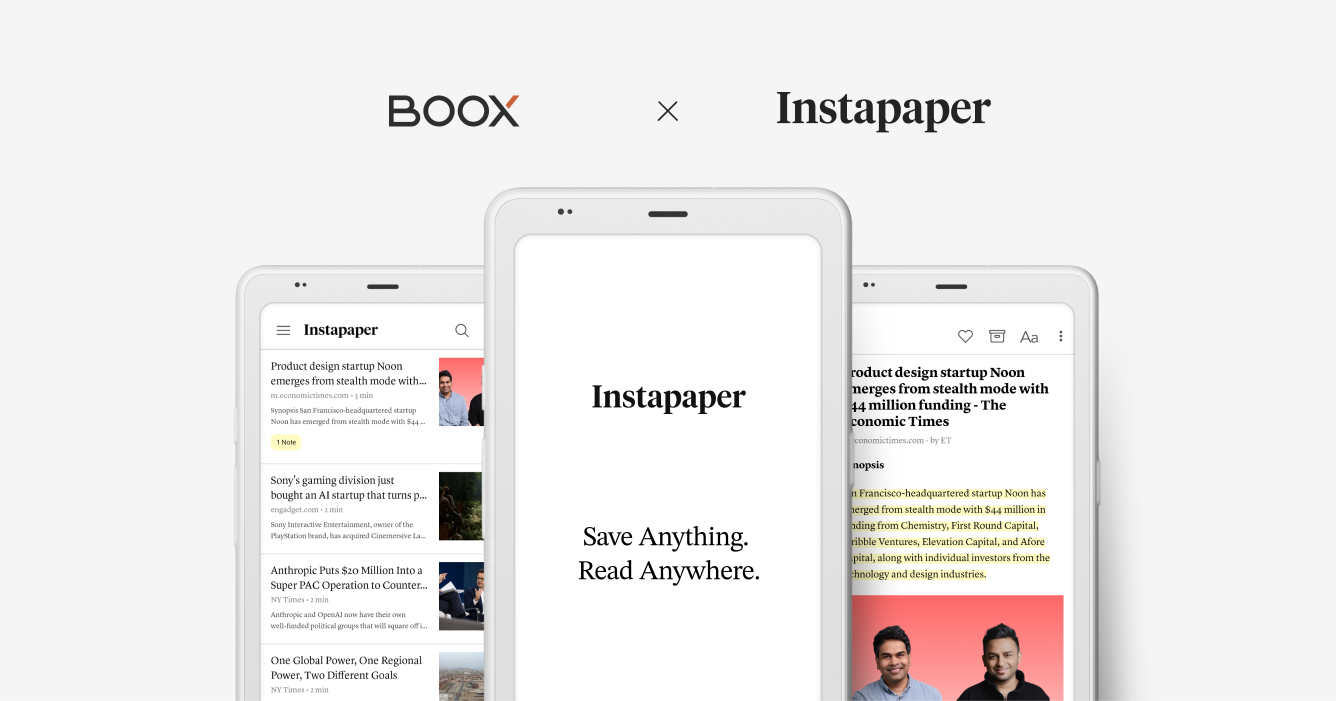
<p>We’re excited to share that Instapaper now comes pre-installed on BOOX <a href="https://shop.boox.com/products/palma2">Palma 2</a> and <a href="https://shop.boox.com/products/palma2pro">Palma 2 Pro</a> devices.</p>

<p>Boox Palma 2 is a pocket-sized, one-handed eReader. Just open Instapaper, sign in, and your reading queue is in your palm: anywhere you are.</p>

<p>To celebrate, in partnership with BOOX, we are giving away five Palma 2 Pro devices to Instapaper users. Instapaper Premium customers are 5 times more likely to win. You can enter for a chance to win at <a href="https://instapaper.com/palma">instapaper.com/palma</a>.</p>

<p><strong>About BOOX</strong></p>

<p>BOOX is a global leader in E Ink electronics, specializing in E Ink tablets and monitors. Its product lineup spans 6-inch to 13.3-inch devices, helping ambitious, persistent, and innovative users boost productivity in work and study — without straining their eyes. BOOX Palma series brings this experience into a pocket-sized, one-handed E Ink reader featuring a color E Ink display, adjustable warm-to-cool frontlight, a fingerprint sensor, and Android system with Google Play support. To learn more, visit <a href="https://shop.boox.com/products/palma2pro">shop.boox.com/products/palma2pro</a>.</p>

<p><strong>Features</strong></p>

<p>The Instapaper app on <a href="https://shop.boox.com/products/palma2">Palma 2</a> and <a href="https://shop.boox.com/products/palma2pro">Palma 2 Pro</a> supports all core Instapaper features, including:</p>

<ul>
  <li>Sync your articles with your Instapaper account.</li>
  <li>Save articles to your Instapaper account.</li>
  <li>Access articles offline.</li>
  <li>Like, archive, and delete articles.</li>
  <li>Highlights and notes.</li>
</ul>

<p>Sign in to Instapaper on your Palma device by opening the pre-installed Instapaper app from your home screen.</p>

<p>We’re excited to bring Instapaper to a device built for pocket-sized, distraction-free reading. As always, if you have any questions, concerns, or requests, you can reach us at <a href="mailto:support@instapaper.com">support@instapaper.com</a>. We look forward to hearing from you!</p>

<p>– Instapaper Team</p>]]></content><author><name></name></author><category term="Announcements" /><summary type="html"><![CDATA[]]></summary><media:thumbnail xmlns:media="http://search.yahoo.com/mrss/" url="/img/boox-hero.png" /><media:content medium="image" url="/img/boox-hero.png" xmlns:media="http://search.yahoo.com/mrss/" /></entry><entry><title type="html">New Website, Instapaper 10 for iOS, and AI Voices for Android</title><link href="/2026/07/28/instapaper-10/" rel="alternate" type="text/html" title="New Website, Instapaper 10 for iOS, and AI Voices for Android" /><published>2026-07-28T13:00:00+00:00</published><updated>2026-07-28T13:00:00+00:00</updated><id>/2026/07/28/instapaper-10</id><content type="html" xml:base="/2026/07/28/instapaper-10/"><![CDATA[<p>Today we’re launching a huge set of improvements across Instapaper: a completely rebuilt website, Instapaper 10 for iOS with Liquid Glass and many new features, and AI Voices for Android.</p>

<h1 id="new-website">New Website</h1>

<p><img src="/img/website-3-column.png" alt="" /></p>

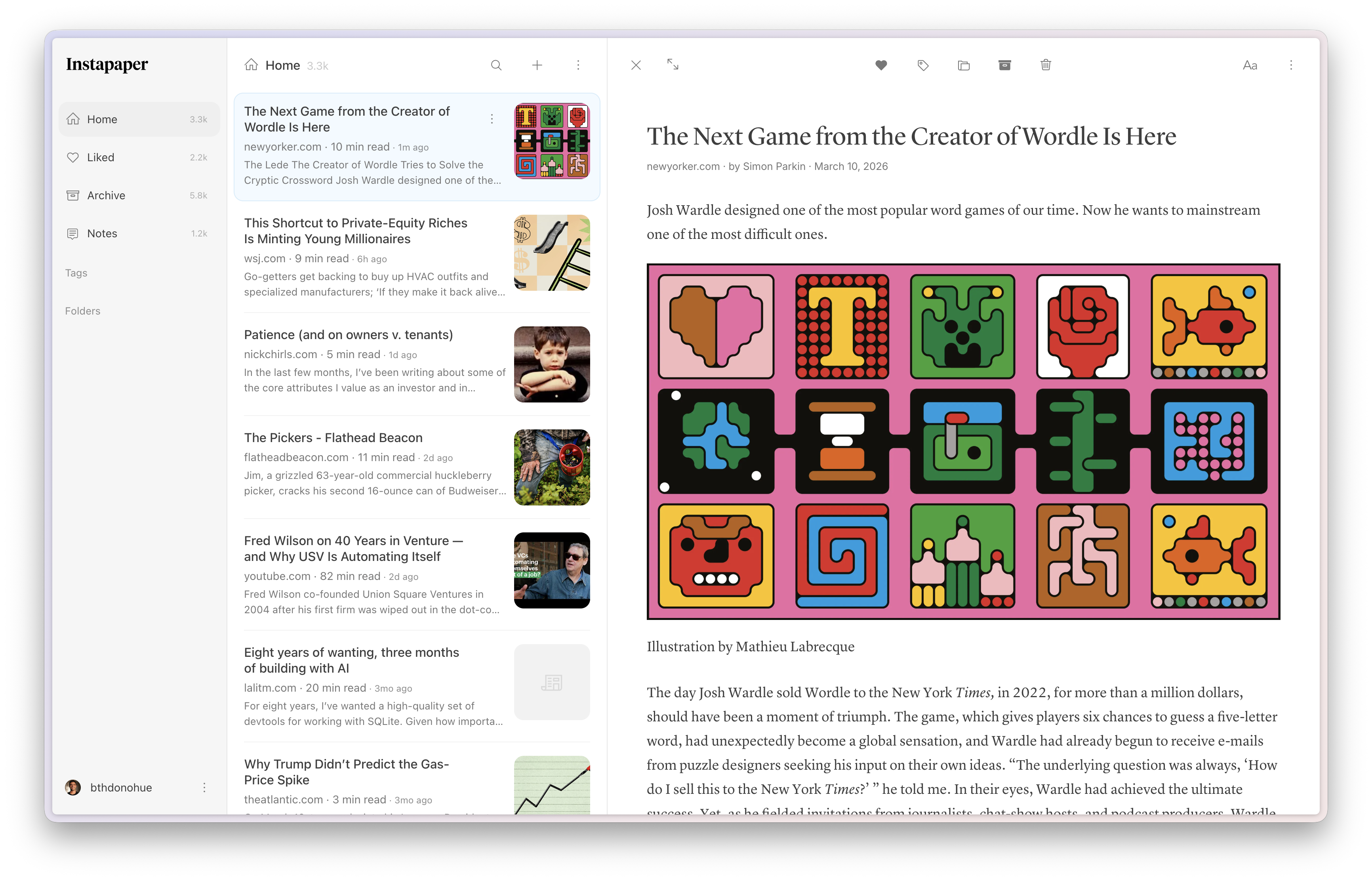
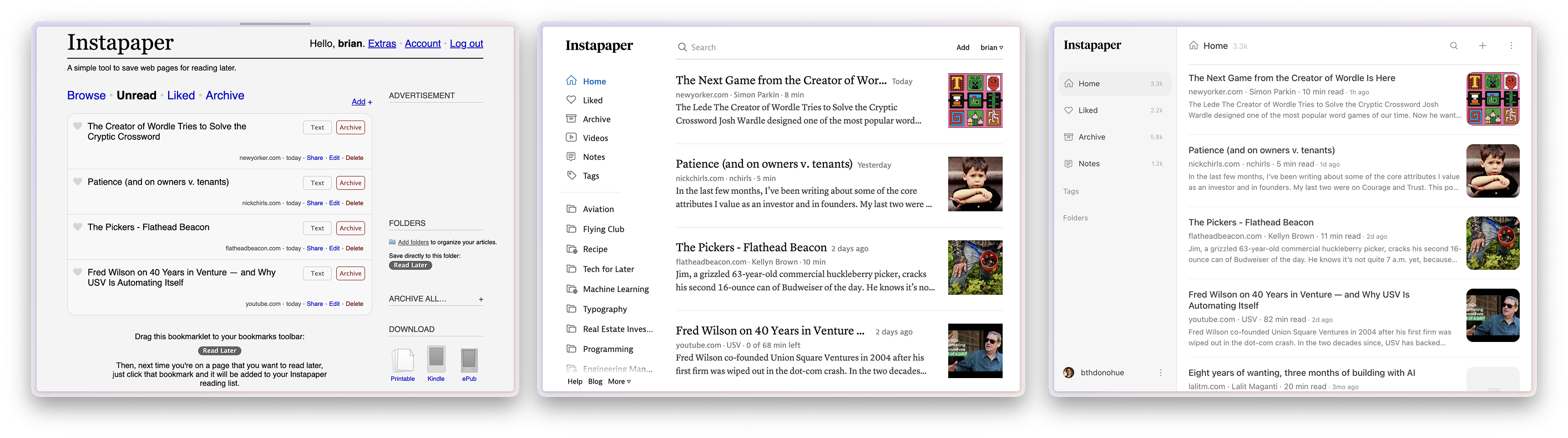
<p>Since 2008, this is only our <a href="/img/website-versions.png">second full rewrite</a> of the Instapaper website. Each rewrite is a big leap forward in functionality, user experience, and performance; this is our best yet. We’re excited to launch it for everyone today. Here are some of the highlights:</p>

<ul>
  <li><strong>3-Column Reader</strong>: On larger screens, there’s a 3-column reading experience that makes it easy to manage your articles and read side-by-side. You can easily jump to fullscreen reader mode by tapping the expand button, or by double-clicking an article in the list.
    <ul>
      <li>You can turn off the 3-Column Reader by tapping the “…” icon next to your profile in the bottom left and toggling Reader off.</li>
    </ul>
  </li>
  <li>
    <p><strong>Multiselect Improvements</strong>: We made significant improvements to multiselect, including Shift+Click to select a range of articles and an improved Select All that lets you apply any action to your entire article list.</p>
  </li>
  <li><strong>Keyboard Shortcuts</strong>: Over the past few years we’ve received many requests for keyboard shortcuts, and we rebuilt the website with them in mind. You can navigate your list with arrow keys, select multiple articles with Shift+Arrow, and perform every article action, including move, tag, archive, and delete. Here’s a full list of keyboard shortcuts:</li>
</ul>

<table>
  <thead>
    <tr>
      <th>Global</th>
      <th> </th>
    </tr>
  </thead>
  <tbody>
    <tr>
      <td>Add link</td>
      <td>⌘K</td>
    </tr>
    <tr>
      <td>Search</td>
      <td>/</td>
    </tr>
    <tr>
      <td>Show keyboard shortcuts</td>
      <td>?</td>
    </tr>
  </tbody>
</table>

<table>
  <thead>
    <tr>
      <th>Article List</th>
      <th> </th>
    </tr>
  </thead>
  <tbody>
    <tr>
      <td>Previous article</td>
      <td>↑</td>
    </tr>
    <tr>
      <td>Next article</td>
      <td>↓</td>
    </tr>
    <tr>
      <td>Open article</td>
      <td>Enter</td>
    </tr>
    <tr>
      <td>Select all articles</td>
      <td>⌘A</td>
    </tr>
    <tr>
      <td>Extend selection up</td>
      <td>Shift ↑</td>
    </tr>
    <tr>
      <td>Extend selection down</td>
      <td>Shift ↓</td>
    </tr>
  </tbody>
</table>

<table>
  <thead>
    <tr>
      <th>Reader</th>
      <th> </th>
    </tr>
  </thead>
  <tbody>
    <tr>
      <td>Archive</td>
      <td>a</td>
    </tr>
    <tr>
      <td>Toggle like</td>
      <td>l</td>
    </tr>
    <tr>
      <td>Move to folder</td>
      <td>m</td>
    </tr>
    <tr>
      <td>Tags</td>
      <td>t</td>
    </tr>
    <tr>
      <td>Edit article</td>
      <td>e</td>
    </tr>
    <tr>
      <td>Delete</td>
      <td>d</td>
    </tr>
    <tr>
      <td>Copy link</td>
      <td>⌘C</td>
    </tr>
    <tr>
      <td>Exit reader view</td>
      <td>Esc</td>
    </tr>
  </tbody>
</table>

<ul>
  <li><strong>Performance</strong>: Website pages now load over <em>60% faster</em>. Combined with usability improvements like keyboard shortcuts, the new website is a major step up from the previous version.</li>
</ul>

<p>As some parts of the new website may not work exactly like the old one, we’re going to continue to maintain the previous website at <a href="https://old.instapaper.com">old.instapaper.com</a> through at least the end of 2026.</p>

<h1 id="instapaper-10-for-ios">Instapaper 10 for iOS</h1>

<p><img src="/img/ios-10.png" alt="" /></p>

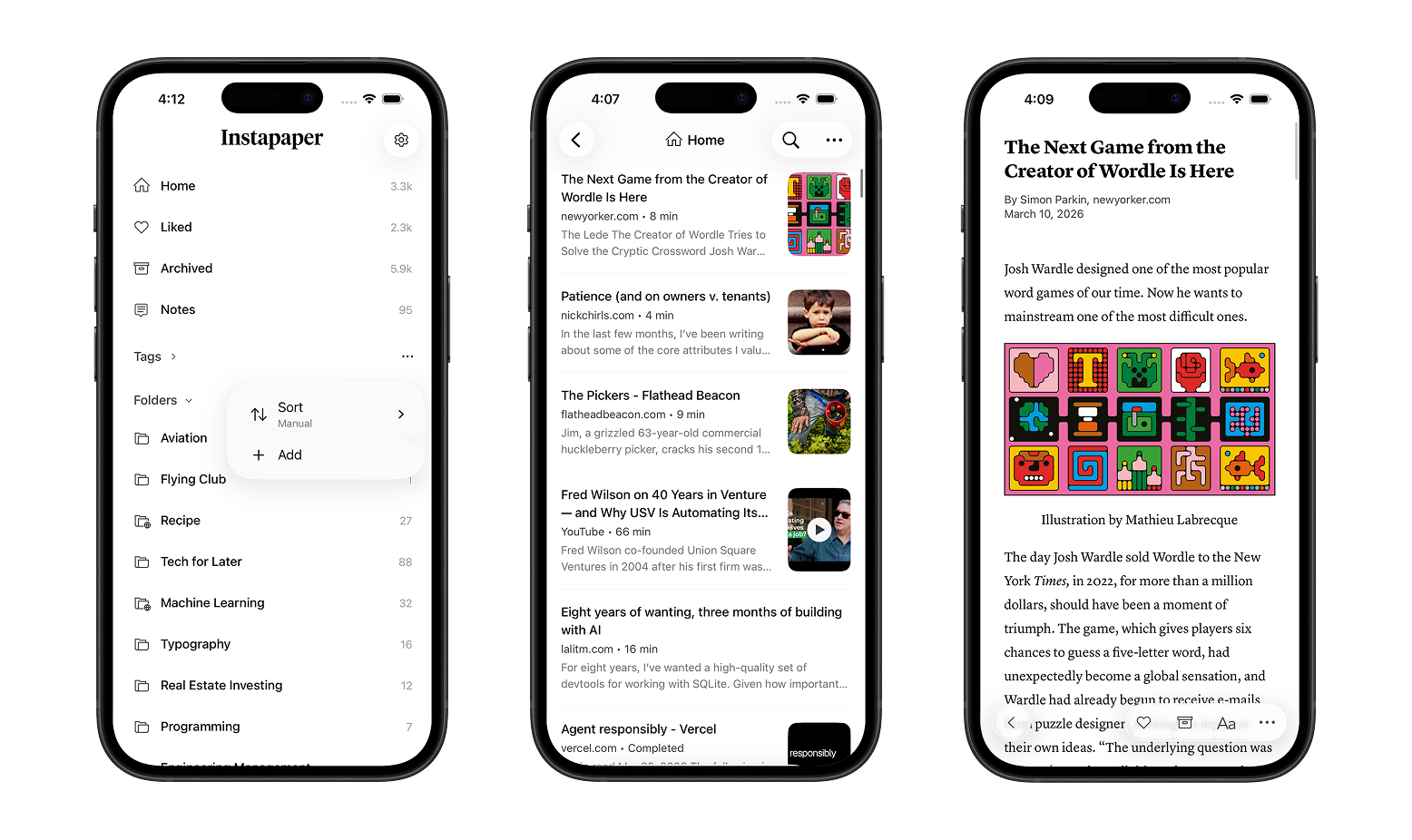
<p>Instapaper 10 is our biggest update to the iOS app in over a decade. It’s a large redesign that adopts Liquid Glass, along with a number of new features and performance improvements.</p>

<ul>
  <li><strong>Section Counts</strong>: All sections now display a count of the articles or notes they contain. If section counts feel more anxiety-inducing than helpful, you can turn them off in Settings &gt; Behavior &gt; Section Counts.</li>
  <li><strong>Section Sorting</strong>: To sort your Folders or Tags, tap the “…” menu next to the section header and choose your preferred sort option.</li>
  <li><strong>Article List Appearance</strong>: We introduced Condensed View, new typography and styles, and an easy way to adjust the article list’s appearance. From an article list, tap “…”, then tap “Appearance” to adjust styles, fonts, and image thumbnails.</li>
  <li><strong>New Reading Fonts</strong>: We’re introducing four new reading fonts in this release, two serifs and two sans-serifs:
    <ul>
      <li><strong>Literata</strong>: Serif font designed by Google for Google Play Books.</li>
      <li><strong>New York</strong>: Serif font designed by Apple for iOS.</li>
      <li><strong>Open Sans</strong>: Sans-serif font commissioned by Google.</li>
      <li><strong>Atkinson Hyperlegible</strong>: Sans-serif font developed by the Braille Institute.</li>
    </ul>
  </li>
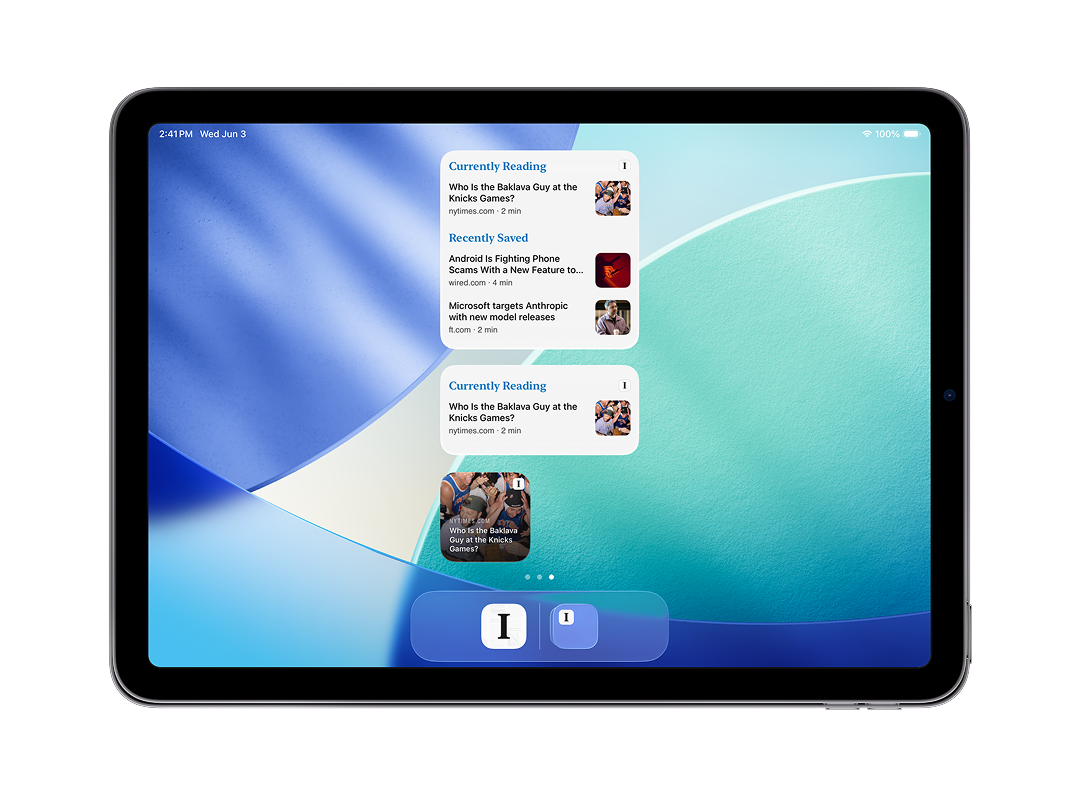
  <li><strong>Home Screen Widget</strong>: Last but not least, we’re excited to launch a Home Screen widget for iOS. It displays your in-progress article and your most recently saved articles, and provides a one-tap shortcut to start reading your Instapaper saves.</li>
</ul>

<p><img src="/img/ios-10-widgets.png" alt="" /></p>

<p>We improved iPad multitasking, redesigned onboarding, made background syncing more reliable, and reduced article download times in this release. Together, these changes make this the fastest and best version of Instapaper for iOS yet.</p>

<h1 id="ai-voices-for-android">AI Voices for Android</h1>

<p>Lastly, we’re launching AI Voices for Android today! Android support required a full rewrite of our text-to-speech system and took a little longer than expected, but we’re really happy with how it turned out. It rounds out a release full of big improvements across the website, iOS, and Android.</p>

<p>Thanks for reading! As always, our roadmap is informed by your feature requests and bug reports, so please don’t hesitate to reach out with any feedback, questions, or concerns to <a href="mailto:support@instapaper.com">support@instapaper.com</a>.</p>

<p>– Instapaper Team</p>]]></content><author><name></name></author><category term="Features" /><summary type="html"><![CDATA[Today we’re launching a huge set of improvements across Instapaper: a completely rebuilt website, Instapaper 10 for iOS with Liquid Glass and many new features, and AI Voices for Android.]]></summary><media:thumbnail xmlns:media="http://search.yahoo.com/mrss/" url="/img/website-3-column.png" /><media:content medium="image" url="/img/website-3-column.png" xmlns:media="http://search.yahoo.com/mrss/" /></entry><entry><title type="html">Relaunching the Instaparser API</title><link href="/2026/03/31/relaunching-the-instaparser-api/" rel="alternate" type="text/html" title="Relaunching the Instaparser API" /><published>2026-03-31T14:30:00+00:00</published><updated>2026-03-31T14:30:00+00:00</updated><id>/2026/03/31/relaunching-the-instaparser-api</id><content type="html" xml:base="/2026/03/31/relaunching-the-instaparser-api/"><![CDATA[<p><img src="/img/instaparser.svg" alt="" /></p>

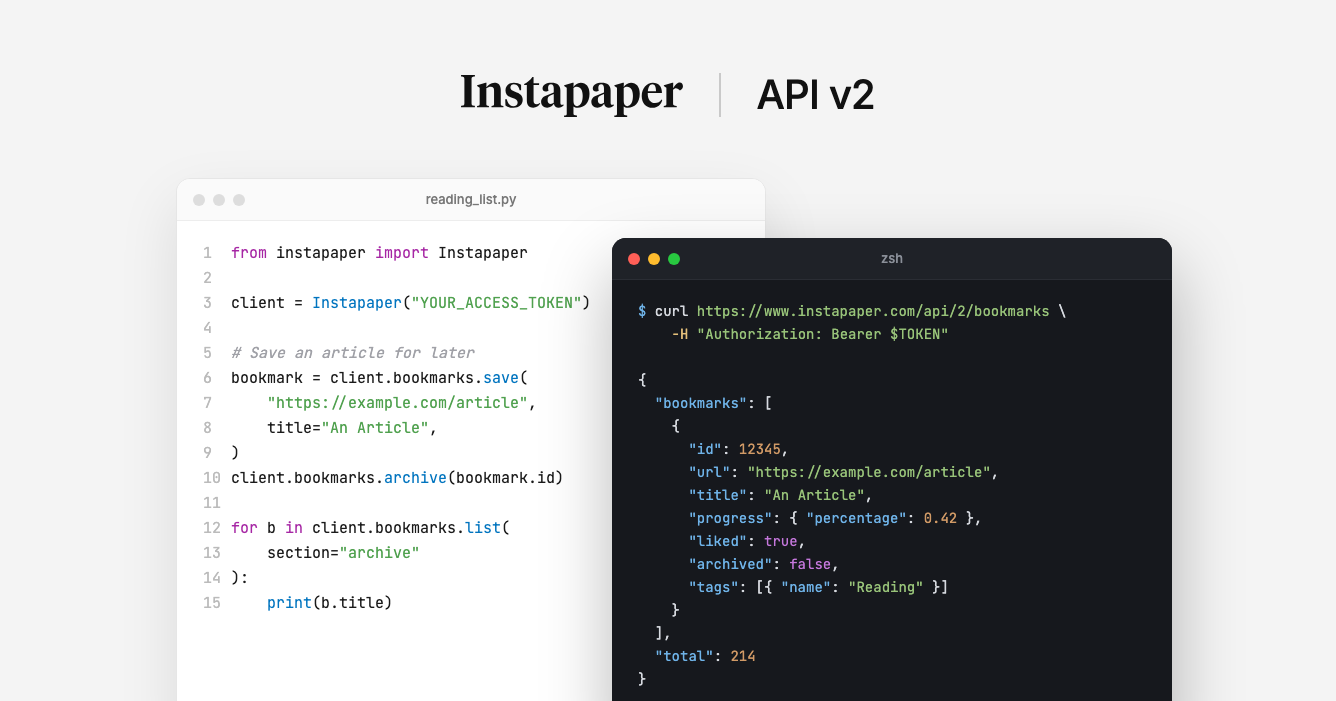
<p>Ten years ago, we <a href="http://blog.instapaper.com/post/142296652536">launched the Instaparser API</a> to give developers access to the same parsing technology that powers Instapaper. Since then, the web has changed dramatically — PDFs are everywhere, LLMs need clean input, and developers need structured content more than ever.</p>

<p>Today, we’re relaunching <a href="https://instaparser.com">Instaparser</a> with three APIs built and refined on Instapaper:</p>

<ul>
  <li><a href="https://instaparser.com/docs/1/article">Article Extraction</a></li>
  <li><a href="https://instaparser.com/docs/1/pdf">PDF Parsing</a></li>
  <li><a href="https://instaparser.com/docs/1/summary">Summarization</a></li>
</ul>

<p>All three are included in every plan, including the free tier which provides 1,000 API credits per month.</p>

<h2 id="article-extraction">Article Extraction</h2>

<p>The Article API is what powers Instapaper’s reader, and it extracts clean, structured content from any URL — title, author, date, body text, images, and metadata. Just pass a URL and get content back as structured JSON, and output the article body as html, text, or markdown.</p>

<div class="language-bash highlighter-rouge"><div class="highlight"><pre class="highlight"><code>curl <span class="s2">"https://instaparser.com/api/1/article"</span> <span class="se">\</span>
  <span class="nt">-H</span> <span class="s2">"Authorization: Bearer YOUR_API_KEY"</span> <span class="se">\</span>
  <span class="nt">-H</span> <span class="s2">"Content-Type: application/json"</span> <span class="se">\</span>
  <span class="nt">-d</span> <span class="s1">'{"url": "https://example.com/post"}'</span>
</code></pre></div></div>

<div class="language-json highlighter-rouge"><div class="highlight"><pre class="highlight"><code><span class="p">{</span><span class="w">
  </span><span class="nl">"title"</span><span class="p">:</span><span class="w"> </span><span class="s2">"How We Built Our Search Engine"</span><span class="p">,</span><span class="w">
  </span><span class="nl">"author"</span><span class="p">:</span><span class="w"> </span><span class="s2">"Jane Kim"</span><span class="p">,</span><span class="w">
  </span><span class="nl">"date"</span><span class="p">:</span><span class="w"> </span><span class="s2">"2026-02-15T09:00:00Z"</span><span class="p">,</span><span class="w">
  </span><span class="nl">"content"</span><span class="p">:</span><span class="w"> </span><span class="s2">"&lt;p&gt;Clean, structured HTML of the article body...&lt;/p&gt;"</span><span class="p">,</span><span class="w">
  </span><span class="nl">"word_count"</span><span class="p">:</span><span class="w"> </span><span class="mi">1847</span><span class="p">,</span><span class="w">
  </span><span class="nl">"thumbnail"</span><span class="p">:</span><span class="w"> </span><span class="s2">"https://example.com/images/hero.jpg"</span><span class="p">,</span><span class="w">
  </span><span class="nl">"excerpt"</span><span class="p">:</span><span class="w"> </span><span class="s2">"A deep dive into building search infrastructure..."</span><span class="w">
</span><span class="p">}</span><span class="w">
</span></code></pre></div></div>

<p><strong>What you can build with it:</strong></p>

<ul>
  <li><strong>Personal article archive</strong>: Extract articles and save them as markdown files on your computer for offline reading or long-term archival.</li>
  <li><strong>Content aggregation</strong>: Pull article content into newsletters, digests, or feeds without dealing with inconsistent HTML.</li>
  <li><strong>RAG pipelines</strong>: Feed clean, structured web content directly into retrieval-augmented generation workflows.</li>
</ul>

<h2 id="pdf-parsing">PDF Parsing</h2>

<p>Upload a PDF or pass a URL to a hosted PDF. Instaparser handles scanned documents, multi-column layouts, and tables. The API generates images for PDF figures, and output the document as html, text, or markdown.</p>

<div class="language-bash highlighter-rouge"><div class="highlight"><pre class="highlight"><code>curl <span class="s2">"https://instaparser.com/api/1/pdf?url=https://example.com/paper.pdf"</span> <span class="se">\</span>
  <span class="nt">-H</span> <span class="s2">"Authorization: Bearer YOUR_API_KEY"</span>
</code></pre></div></div>

<p>We’ve been building our <a href="https://blog.instapaper.com/post/791134578856378368/pdf-support-localization-and-international">PDF parser</a> for Instapaper over the past couple of years, and with the Instaparser API you can now use it in your own applications.</p>

<p><strong>What you can build with it:</strong></p>

<ul>
  <li><strong>LLM input</strong>: Convert PDFs to clean text for use as context in large language models, without wrestling with parsing libraries or losing document structure.</li>
  <li><strong>Figure and table extraction</strong>: Pull structured content from research papers or financial reports for downstream analysis or visualization.</li>
  <li><strong>Document processing</strong>: Automate extraction from legal filings, academic papers, or internal documents at scale.</li>
</ul>

<h2 id="summarization">Summarization</h2>

<p>The Summary API returns a concise summary of a URL with a single API call. The Summary API extracts key sentences and generates a summary from the page content — useful for previews, context compression, and content curation.</p>

<div class="language-bash highlighter-rouge"><div class="highlight"><pre class="highlight"><code>curl <span class="s2">"https://instaparser.com/api/1/summary"</span> <span class="se">\</span>
  <span class="nt">-H</span> <span class="s2">"Authorization: Bearer YOUR_API_KEY"</span> <span class="se">\</span>
  <span class="nt">-H</span> <span class="s2">"Content-Type: application/json"</span> <span class="se">\</span>
  <span class="nt">-d</span> <span class="s1">'{"url": "https://example.com/long-article"}'</span>
</code></pre></div></div>

<p><strong>What you can build with it:</strong></p>

<ul>
  <li><strong>Link previews</strong>: Generate rich preview cards with meaningful summaries instead of truncated meta descriptions.</li>
  <li><strong>Content curation</strong>: Quickly assess whether an article is worth a full read by reviewing its key sentences.</li>
  <li><strong>LLM context compression</strong>: Trim long articles down to their essential points before passing them into context windows, reducing token costs.</li>
  <li><strong>Email digests</strong>: Summarize a collection of articles into a digestible newsletter or daily roundup.</li>
</ul>

<h2 id="getting-started">Getting Started</h2>

<p>All three APIs are included in every Instaparser plan, including the free tier. <a href="https://instaparser.com/pricing">Sign up for an API key</a> and start making requests in minutes.</p>

<p>We offer official SDKs for Python and Node.js, or you can use the REST API directly with curl or any HTTP client.</p>

<p><strong>Python</strong></p>

<div class="language-bash highlighter-rouge"><div class="highlight"><pre class="highlight"><code>pip <span class="nb">install </span>instaparser
</code></pre></div></div>

<div class="language-python highlighter-rouge"><div class="highlight"><pre class="highlight"><code><span class="kn">from</span> <span class="nn">instaparser</span> <span class="kn">import</span> <span class="n">InstaparserClient</span>

<span class="n">client</span> <span class="o">=</span> <span class="n">InstaparserClient</span><span class="p">(</span><span class="s">"YOUR_API_KEY"</span><span class="p">)</span>
<span class="n">article</span> <span class="o">=</span> <span class="n">client</span><span class="p">.</span><span class="n">Article</span><span class="p">(</span><span class="s">"https://example.com/post"</span><span class="p">)</span>
<span class="k">print</span><span class="p">(</span><span class="n">article</span><span class="p">.</span><span class="n">title</span><span class="p">)</span>    <span class="c1"># "How We Built Our Search Engine"
</span><span class="k">print</span><span class="p">(</span><span class="n">article</span><span class="p">.</span><span class="n">content</span><span class="p">)</span>  <span class="c1"># "&lt;p&gt;Clean, structured HTML...&lt;/p&gt;"
</span></code></pre></div></div>

<p><strong>Node.js</strong></p>

<div class="language-bash highlighter-rouge"><div class="highlight"><pre class="highlight"><code>npm <span class="nb">install </span>instaparser-api
</code></pre></div></div>

<div class="language-javascript highlighter-rouge"><div class="highlight"><pre class="highlight"><code><span class="k">import</span> <span class="p">{</span> <span class="nx">InstaparserClient</span> <span class="p">}</span> <span class="k">from</span> <span class="dl">'</span><span class="s1">instaparser-api</span><span class="dl">'</span><span class="p">;</span>

<span class="kd">const</span> <span class="nx">client</span> <span class="o">=</span> <span class="k">new</span> <span class="nx">InstaparserClient</span><span class="p">({</span> <span class="na">apiKey</span><span class="p">:</span> <span class="dl">'</span><span class="s1">YOUR_API_KEY</span><span class="dl">'</span> <span class="p">});</span>
<span class="kd">const</span> <span class="nx">article</span> <span class="o">=</span> <span class="k">await</span> <span class="nx">client</span><span class="p">.</span><span class="nx">article</span><span class="p">({</span> <span class="na">url</span><span class="p">:</span> <span class="dl">'</span><span class="s1">https://example.com/post</span><span class="dl">'</span> <span class="p">});</span>
<span class="nx">console</span><span class="p">.</span><span class="nx">log</span><span class="p">(</span><span class="nx">article</span><span class="p">.</span><span class="nx">title</span><span class="p">);</span>   <span class="c1">// "How We Built Our Search Engine"</span>
<span class="nx">console</span><span class="p">.</span><span class="nx">log</span><span class="p">(</span><span class="nx">article</span><span class="p">.</span><span class="nx">content</span><span class="p">);</span> <span class="c1">// "&lt;p&gt;Clean, structured HTML...&lt;/p&gt;"</span>
</code></pre></div></div>

<p><strong>curl</strong></p>

<div class="language-bash highlighter-rouge"><div class="highlight"><pre class="highlight"><code>curl <span class="s2">"https://instaparser.com/api/1/article"</span> <span class="se">\</span>
  <span class="nt">-H</span> <span class="s2">"Authorization: Bearer YOUR_API_KEY"</span> <span class="se">\</span>
  <span class="nt">-H</span> <span class="s2">"Content-Type: application/json"</span> <span class="se">\</span>
  <span class="nt">-d</span> <span class="s1">'{"url": "https://example.com/post"}'</span>
</code></pre></div></div>

<h2 id="no-code--ai-integrations">No-Code &amp; AI Integrations</h2>

<p>Instaparser is also available through popular no-code and AI platforms:</p>

<ul>
  <li><strong>Claude Code</strong>: Add Instaparser as a plugin to give Claude the ability to use Instaparser to extract and summarize content during conversations.
    <div class="language-bash highlighter-rouge"><div class="highlight"><pre class="highlight"><code><span class="o">&gt;</span> /plugin marketplace add instapaper/instaparser-claude-plugin 
<span class="o">&gt;</span> /plugin <span class="nb">install </span>instaparser
<span class="o">&gt;</span> /reload-plugins
<span class="o">&gt;</span> Instaparser extract PDF from https://bitcoin.org/bitcoin.pdf and write to markdown file 
</code></pre></div>    </div>
  </li>
  <li><strong>OpenClaw</strong>: Use Instaparser as a document loader to feed clean, structured web content into your LangChain pipelines.
    <div class="language-bash highlighter-rouge"><div class="highlight"><pre class="highlight"><code>openclaw skills <span class="nb">install </span>instaparser
</code></pre></div>    </div>
  </li>
  <li><strong>n8n</strong>: Use the Instaparser node to extract articles, parse PDFs, and summarize content as part of your automation workflows.
    <ul>
      <li>We hoped to have the <a href="https://www.npmjs.com/package/n8n-nodes-instaparser">Instaparser n8n node</a> ready for launch, but it’s still in review by n8n.</li>
      <li>If you manage a local n8n instance, you can install the Instaparser n8n node by following <a href="https://docs.n8n.io/integrations/community-nodes/installation/gui-install/">these instructions</a>.</li>
    </ul>
  </li>
</ul>

<p>We’re actively working on more integrations. If there’s a platform you’d like to see Instaparser on, let us know at <a href="mailto:support@instaparser.com">support@instaparser.com</a>.</p>

<h2 id="pricing">Pricing</h2>

<p>All plans include access to all three APIs. No per-feature charges or credit multipliers.</p>

<table>
  <thead>
    <tr>
      <th>Plan</th>
      <th>Price</th>
      <th>Monthly Credits</th>
      <th>Rate Limit</th>
    </tr>
  </thead>
  <tbody>
    <tr>
      <td><strong>Trial</strong></td>
      <td>Free</td>
      <td>1,000</td>
      <td>1 req/sec</td>
    </tr>
    <tr>
      <td><strong>Beta</strong></td>
      <td>$150/mo</td>
      <td>100,000</td>
      <td>5 req/sec</td>
    </tr>
    <tr>
      <td><strong>Live</strong></td>
      <td>$500/mo</td>
      <td>500,000</td>
      <td>25 req/sec</td>
    </tr>
    <tr>
      <td><strong>Scale</strong></td>
      <td>$900/mo</td>
      <td>1,000,000</td>
      <td>50 req/sec</td>
    </tr>
    <tr>
      <td><strong>Enterprise</strong></td>
      <td>Custom</td>
      <td>10M+</td>
      <td>Unlimited</td>
    </tr>
  </tbody>
</table>

<p>Paid plans include overage pricing so you never hit a wall mid-workflow. Full pricing details are available at <a href="https://instaparser.com/pricing">instaparser.com/pricing</a>. For Enterprise or custom volume requirements, contact us at <a href="mailto:support@instaparser.com">support@instaparser.com</a>.</p>

<h2 id="built-on-15-years-of-parsing">Built on 15+ Years of Parsing</h2>

<p>Instaparser isn’t a new product — it’s built on the same engine that has powered Instapaper’s reading experience since 2008, refined across billions of articles. The edge cases you’ll encounter parsing the messy, modern web, we’ve already solved.</p>

<p>We’re excited to open this up to developers again and can’t wait to see what you build. If you have any questions, feedback, or want to share what you’re working on, reach out to <a href="mailto:support@instaparser.com">support@instaparser.com</a>.</p>

<p><a href="https://instaparser.com/pricing">Get your API key →</a></p>

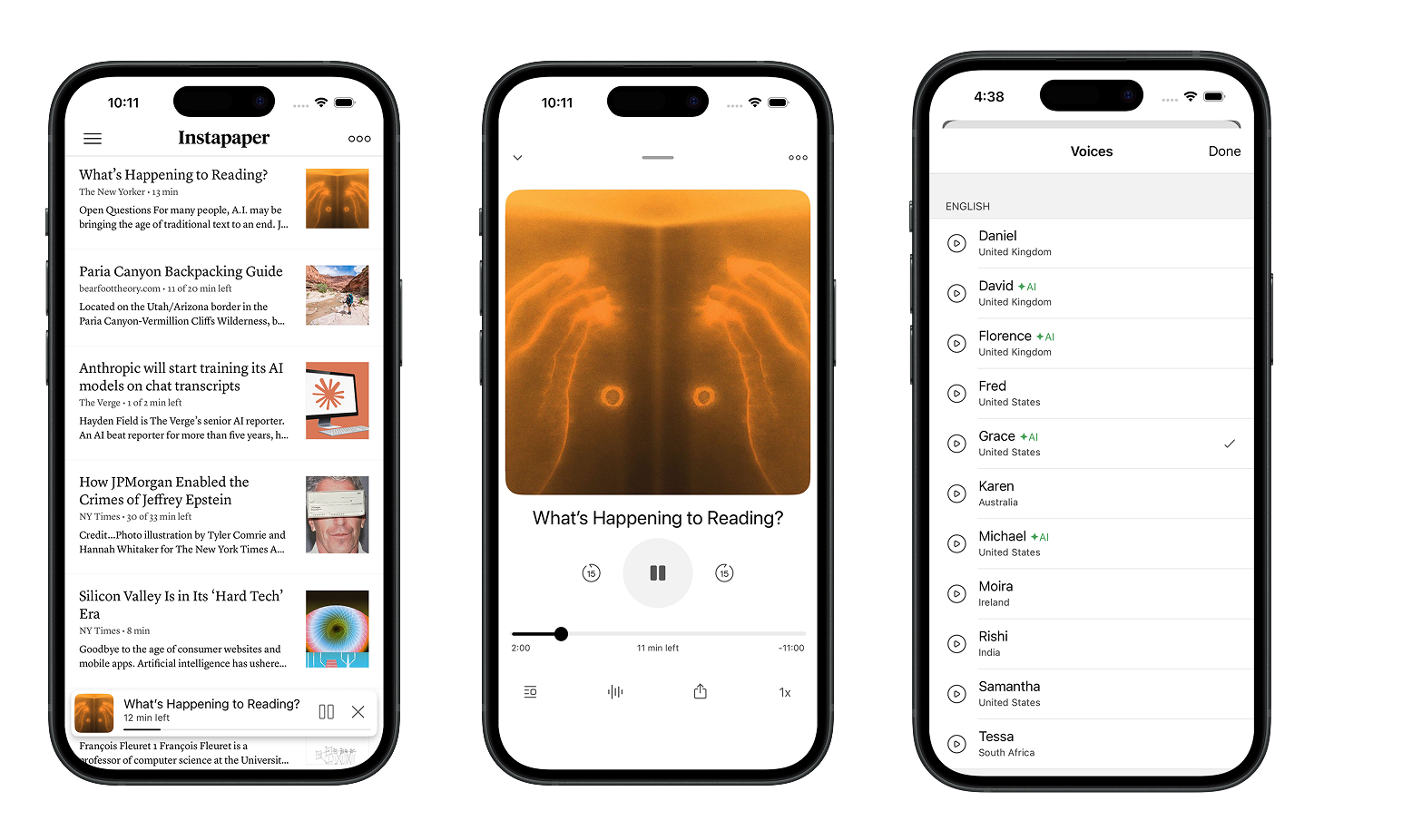
<p>– Instapaper Team</p>]]></content><author><name></name></author><category term="API" /><summary type="html"><![CDATA[]]></summary><media:thumbnail xmlns:media="http://search.yahoo.com/mrss/" url="/img/instaparser.svg" /><media:content medium="image" url="/img/instaparser.svg" xmlns:media="http://search.yahoo.com/mrss/" /></entry><entry><title type="html">AI Voices, Text-to-Speech Redesign, and Android Update</title><link href="/post/802011928668094464/ai-voices-text-to-speech-redesign-and-android" rel="alternate" type="text/html" title="AI Voices, Text-to-Speech Redesign, and Android Update" /><published>2025-12-04T11:22:57+00:00</published><updated>2025-12-04T11:22:57+00:00</updated><id>/post/802011928668094464/ai-voices-text-to-speech-redesign-and-android</id><content type="html" xml:base="/post/802011928668094464/ai-voices-text-to-speech-redesign-and-android"><![CDATA[<p>Today, we’re excited to launch AI Voices, which are high-quality, streaming text-to-speech voices. We’ve completely redesigned the text-to-speech player to make it more modern and intuitive. Lastly, we’re launching a major Android update with an improved search experience and a number of other features.</p>

<h2 id="ai-voices"><strong>AI Voices</strong></h2>

<p>Instapaper has supported <a href="https://blog.instapaper.com/post/97750859246">text-to-speech for over 10 years</a>, leveraging system voices available from iOS and Android. The state of the art has improved significantly since we first launch text-to-speech, and we’re excited to launch 17 high-quality text-to-speech voices across the following languages and accents:</p>

<ul>
  <li>English (US)</li>
  <li>English (UK)</li>
  <li>Chinese</li>
  <li>French</li>
  <li>Italian</li>
  <li>Japanese</li>
  <li>Hindi</li>
  <li>Spanish</li>
  <li>Portuguese</li>
</ul>

<p>Below you can listen to the first paragraph of this post with a System Voice versus the new AI Voice:</p>

<p><strong>System Voice</strong> <strong>(Samantha)</strong></p>

<audio controls="controls"><source src="https://embed.instapaper.com/blog/blog_sam.mp3" type="audio/mpeg" />&lt;/source&gt;</audio>

<p><strong>AI Voice</strong> <strong>(Grace)</strong></p>

<audio controls="controls"><source src="https://embed.instapaper.com/blog/blog_grace.mp3" type="audio/mpeg" />&lt;/source&gt;</audio>

<p>AI Voices are available on Instapaper iOS 9.4 with a <a href="https://instapaper.com/premium">Premium subscription</a>. Android support will be coming soon!</p>

<h2 id="text-to-speech-redesign"><strong>Text-to-Speech Redesign</strong></h2>

<p><img src="/img/tts_redesign.png" alt="" /></p>

<p>In addition to the AI Voices, we’ve completely redesigned text-to-speech as a floating player throughout the application. You can easily expand the player to navigate to Playlist, select different voices, or manage articles while listening.</p>

<p>It’s a huge improvement to the previous experience, especially when combined with enhanced AI voices.</p>

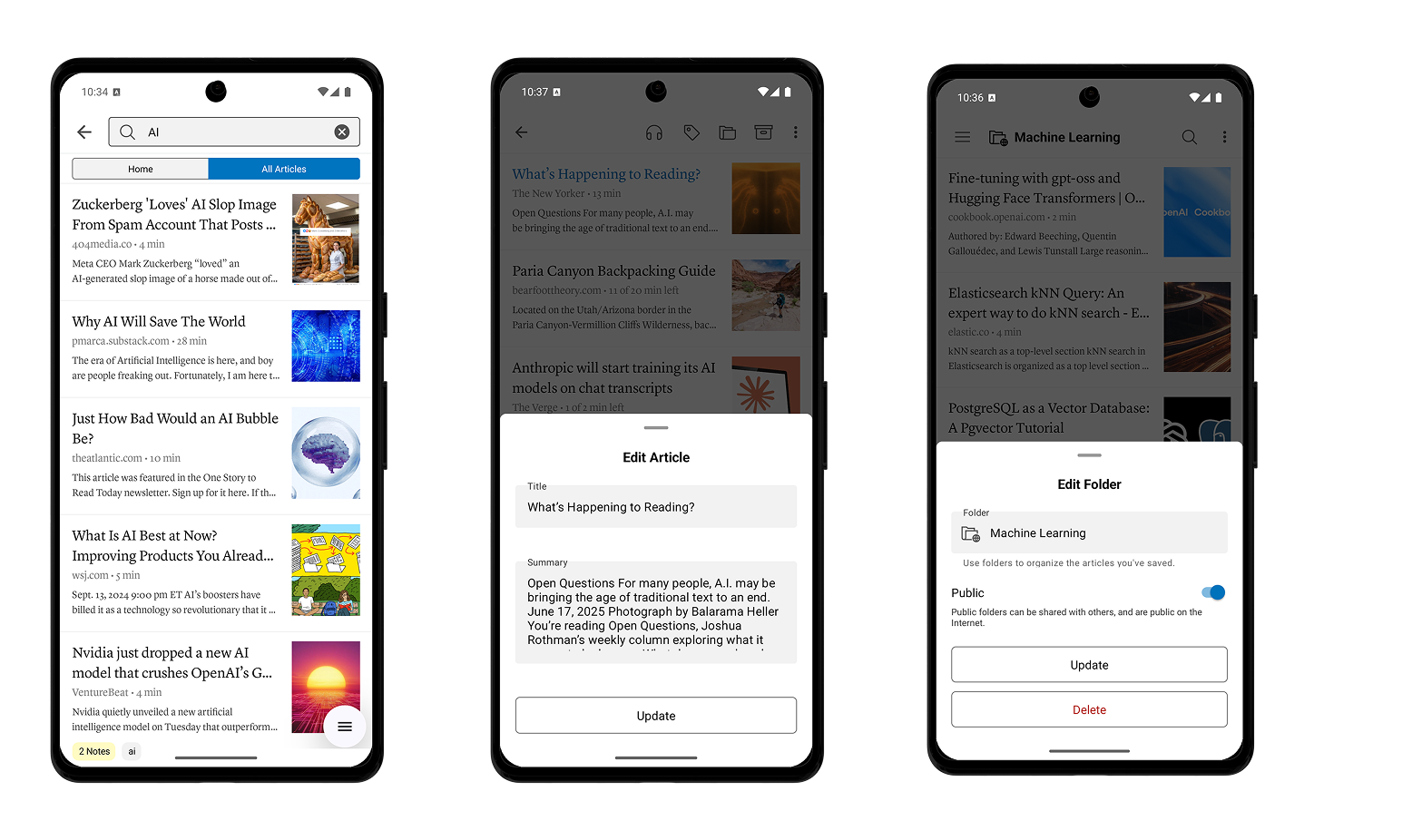
<h2 id="android-64-launch"><strong>Android 6.4 Launch</strong></h2>

<p><img src="/img/android_6.4.png" alt="" /></p>

<p>We’re also excited to announce the launch of Instapaper Android 6.4:</p>

<ul>
  <li><strong>Search Improvements:</strong> Local, title-only search is now free and available for all Instapaper users. Full-text search now always opens articles in the reader view, where previously, non-sync’d articles would only open the original website.</li>
  <li><strong>Article Editing:</strong> Edit article titles and descriptions by long-pressing an article &gt; Tap “…” &gt; Tap “Edit”.</li>
  <li><strong>Folder &amp; Tag Editing:</strong> Edit the names of folders and tags by navigating to the folder or tag &gt; Tap “…” &gt; Tap “Edit”.</li>
  <li><strong>Public Folder Support:</strong> Android 6.4 includes support for public folders, showing which folders are public in the menu, and enabling the ability to set folders as public or private.</li>
  <li><strong>Other fixes &amp; improvements:</strong> This release also comes with a number of stability and performance improvements.</li>
</ul>

<p>Thanks for reading! As always, our roadmap is informed by your feature requests and bug reports, so please don’t hesitate to reach out with any feedback, questions, or concerns to <a href="http://instapaper.com/">support@instapaper.com</a>.</p>

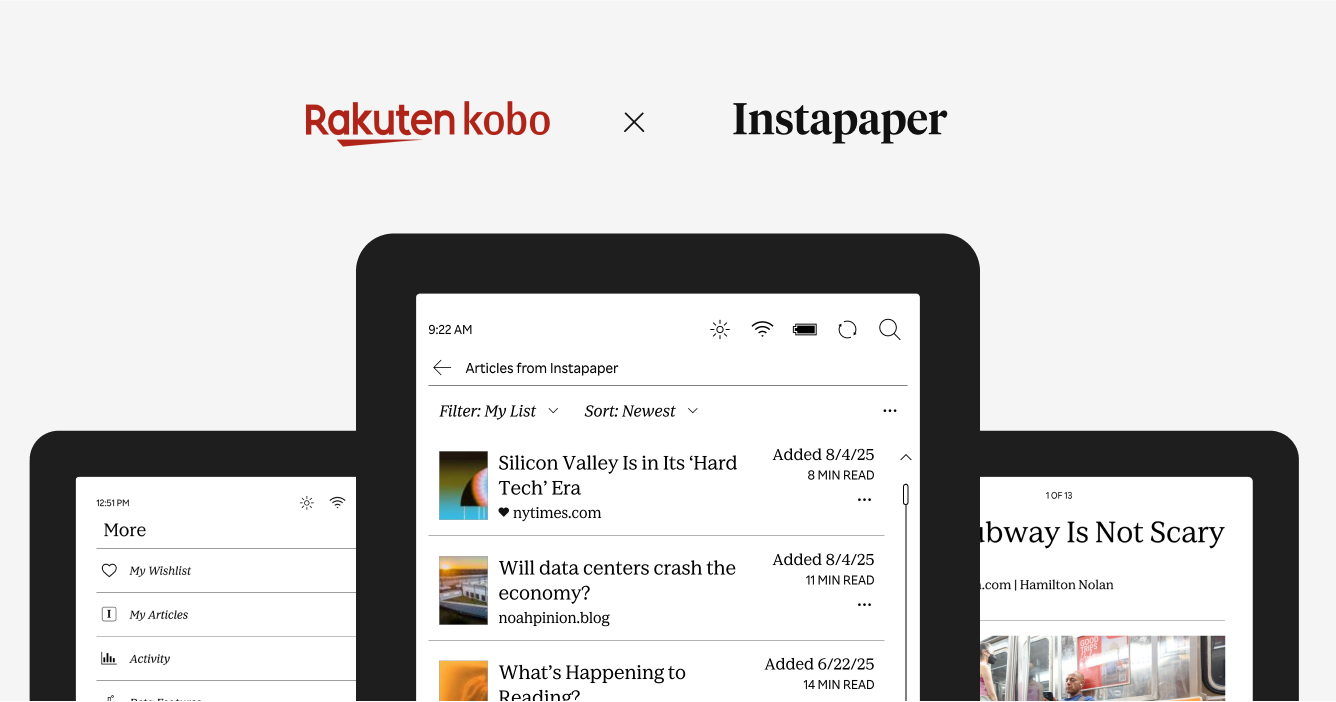
<p>– Instapaper Team</p>]]></content><author><name></name></author><category term="Features" /><summary type="html"><![CDATA[Today, we’re excited to launch AI Voices, which are high-quality, streaming text-to-speech voices. We’ve completely redesigned the text-to-speech player to make it more modern and intuitive. Lastly, we’re launching a major Android update with an improved search experience and a number of other features.]]></summary><media:thumbnail xmlns:media="http://search.yahoo.com/mrss/" url="/img/tts_redesign.png" /><media:content medium="image" url="/img/tts_redesign.png" xmlns:media="http://search.yahoo.com/mrss/" /></entry><entry><title type="html">Rakuten Kobo Integration is Live!</title><link href="/post/793128283946532864/rakuten-kobo-integration-is-live" rel="alternate" type="text/html" title="Rakuten Kobo Integration is Live!" /><published>2025-08-28T10:01:14+00:00</published><updated>2025-08-28T10:01:14+00:00</updated><id>/post/793128283946532864/rakuten-kobo-integration-is-live</id><content type="html" xml:base="/post/793128283946532864/rakuten-kobo-integration-is-live"><![CDATA[<p><img src="/img/kobo-hero.png" alt="" /></p>

<p>We’re excited to share that Instapaper is now live on all Rakuten Kobo eReaders. Now you can log into Instapaper on your Kobo, download your list of articles, and read them on the go.</p>

<p>To celebrate, in partnership with Kobo, we are giving away 15 Kobo Clara Colour eReaders to Instapaper users. You can enter a chance to win a Kobo eReader at <a href="http://instapaper.com/kobo">instapaper.com/kobo</a>.</p>

<p><strong>About Rakuten Kobo</strong></p>

<p>Rakuten Kobo Inc. is the world’s digital bookseller created by and for booklovers, <a href="https://click.linksynergy.com/fs-bin/click?id=sYIs%2a2Ukl2A&amp;offerid=1562891.1483&amp;type=3&amp;subid=0">providing the best dedicated eReaders</a> and apps for reading. Owned by Tokyo-based Rakuten Group, Inc. and headquartered in Toronto, Rakuten Kobo’s millions of worldwide users can read anytime, anywhere, and on any device. With a mission to make reading lives better for all, Rakuten Kobo connects readers to stories using thoughtful and personalized curation of eBooks and audiobooks. With the singular focus of making reading lives the best they can be, Kobo’s open platform allows people to fit reading into more moments in their busy lives. To learn more about Rakuten Kobo, visit <a href="https://www.kobo.com/">www.kobo.com</a>.</p>

<p><strong>Features</strong></p>

<p>The Kobo integration supports the following features:</p>

<ul>
  <li>Sync your articles with your Instapaper account.</li>
  <li>Access articles offline.</li>
  <li>Like, archive, and delete articles.</li>
  <li>Save articles to your Instapaper account.</li>
</ul>

<p>You can sign in to Instapaper on your Kobo by navigating to More &gt; My Articles.</p>

<p>We know many of you have been asking for an Instapaper integration on Kobo for many years, and we’re excited to launch this integration. As always, if you have any questions, concerns, or requests, you can reach us at <a href="http://instapaper.com/">support@instapaper.com</a>. We look forward to hearing from you!</p>

<p>– Instapaper Team</p>]]></content><author><name></name></author><category term="Announcements" /><summary type="html"><![CDATA[]]></summary><media:thumbnail xmlns:media="http://search.yahoo.com/mrss/" url="/img/kobo-hero.png" /><media:content medium="image" url="/img/kobo-hero.png" xmlns:media="http://search.yahoo.com/mrss/" /></entry><entry><title type="html">PDF Support, Localization, and International Pricing</title><link href="/post/791134578856378368/pdf-support-localization-and-international" rel="alternate" type="text/html" title="PDF Support, Localization, and International Pricing" /><published>2025-08-06T09:52:08+00:00</published><updated>2025-08-06T09:52:08+00:00</updated><id>/post/791134578856378368/pdf-support-localization-and-international</id><content type="html" xml:base="/post/791134578856378368/pdf-support-localization-and-international"><![CDATA[<p><img src="/img/pdf_beta.png" alt="" /></p>

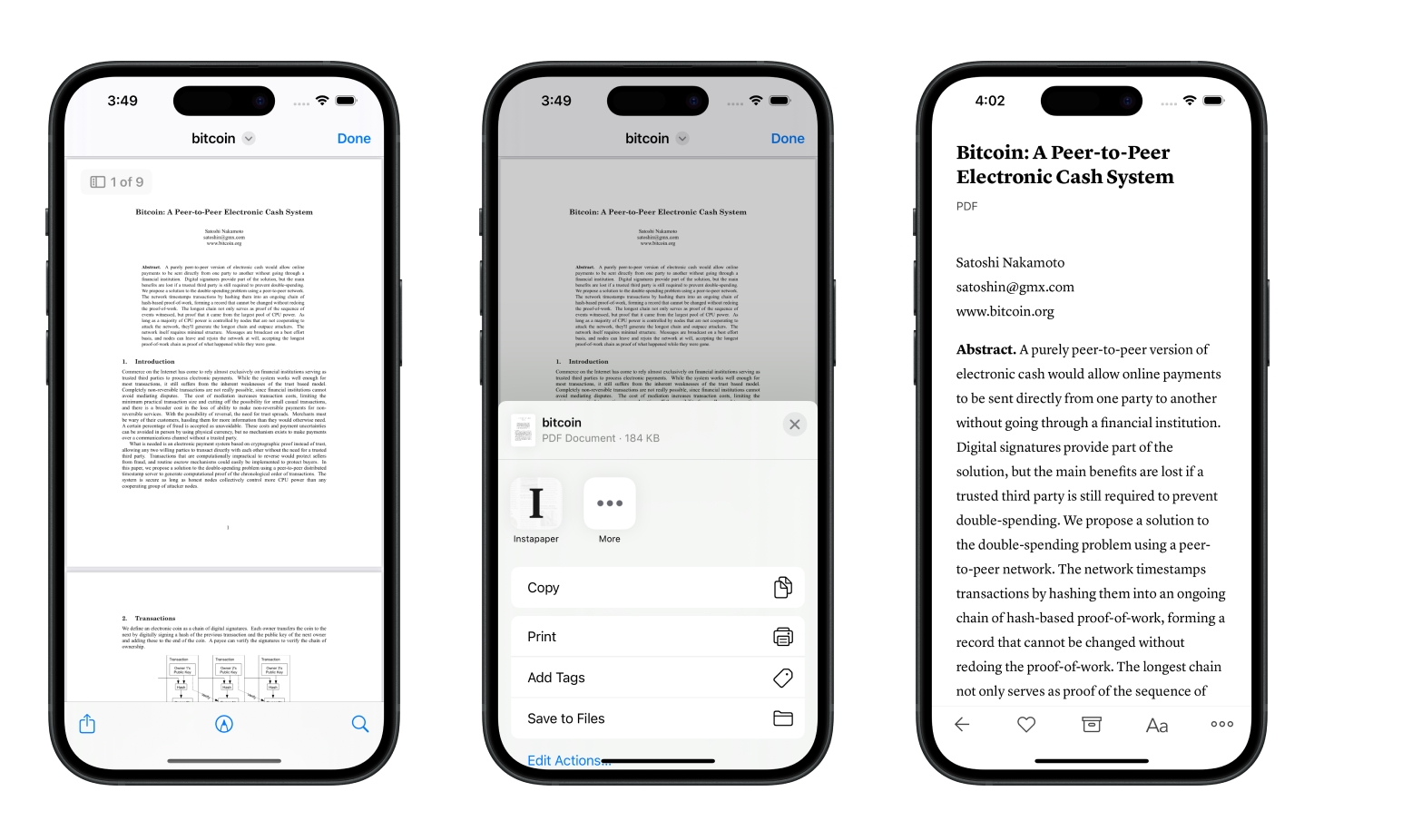
<p>We’re excited to (finally) launch PDF support for Instapaper! Our focus for PDFs is to make them more readable, especially on mobile devices, and bring the suite of Instapaper tools to PDFs including highlighting, notes, text-to-speech, etc.</p>

<p>For years, we’ve been at work building a PDF Parser that is up to our standards for great reading experiences. We’ve really enjoyed reading PDFs on Instapaper, and have received really positive feedback from beta testers.</p>

<p>Given PDFs require additional processing, PDF support will only be available for <a href="https://instapaper.com/premium">Instapaper Premium customers</a>.</p>

<p><strong>Saving PDFs to Instapaper</strong></p>

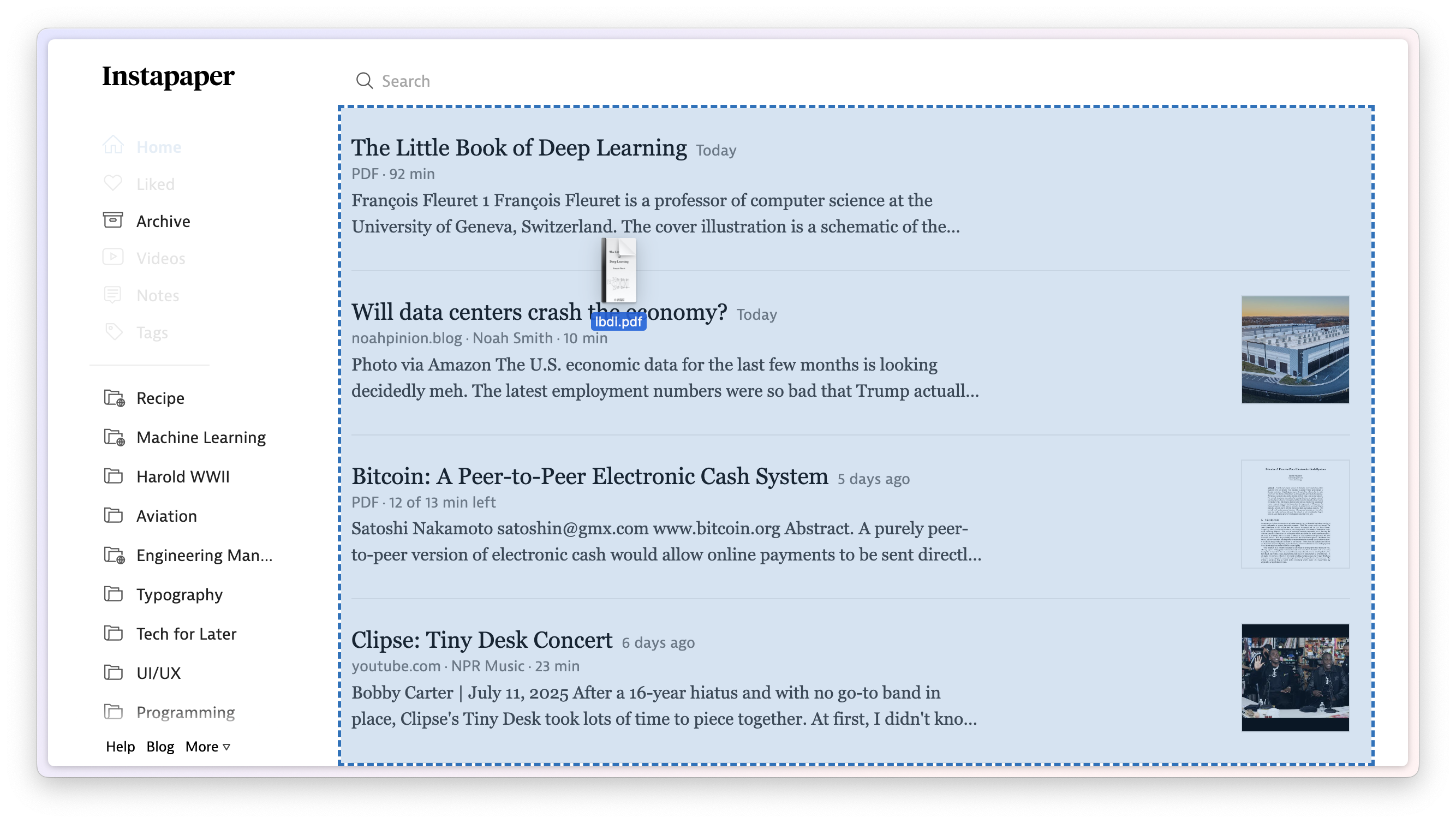
<p><img src="/img/file-upload.png" alt="" /></p>

<p>We have expanded most of our existing “save” methods to support PDFs. You can save PDFs to Instapaper using any of the following methods:</p>

<ul>
  <li>Use one of our <a href="https://instapaper.com/save">browser extensions</a> to save a PDF from a link on the web.</li>
  <li>Drag &amp; drop a PDF (or several PDFs) to <a href="http://instapaper.com/">instapaper.com</a> in order to save.</li>
  <li>Upload PDFs from iOS, macOS, or Android using new share extensions.</li>
  <li>Attach a PDF to an email and send to your <a href="https://instapaper.com/save/email">Save to Instapaper email address</a>.</li>
</ul>

<p><strong>Localizations</strong></p>

<p>Historically, Instapaper has supported 13 localizations other than English: Dutch, German, French, Italian, Japanese, Korean, Polish, Portuguese, Russian, Spanish, Turkish, Chinese Simplified, and Chinese Traditional.</p>

<p>Our iOS app had only 65% of strings translated, and Android had only 70% of strings translated.</p>

<p>We’ve onboarded a new localization vendor, and we’ve brought those translations up to 99% across iOS and Android. Additionally, we’re working to localize and translate the core app flows on <a href="http://instapaper.com/">instapaper.com</a>.</p>

<p><strong>International Pricing</strong></p>

<p>We’re significantly reducing international pricing in certain markets for Instapaper Premium.</p>

<p>When we first <a href="https://blog.instapaper.com/post/97750859246">launched Instapaper Premium in 2014</a>, we set international pricing automatically on the App Store and Google Play based on the USD price and 2014 conversion rates.</p>

<p>In 2024, when we <a href="https://blog.instapaper.com/post/735784644474208256/permanent-archive-and-premium-price-change">increased the price of Instapaper Premium</a>, we updated the USD price point and used the 2024 conversion rate, which significantly increased the price of Instapaper Premium in some international markets.</p>

<p>That was a mistake. We didn’t appropriately predict how the price change would impact each locale and we apologize.</p>

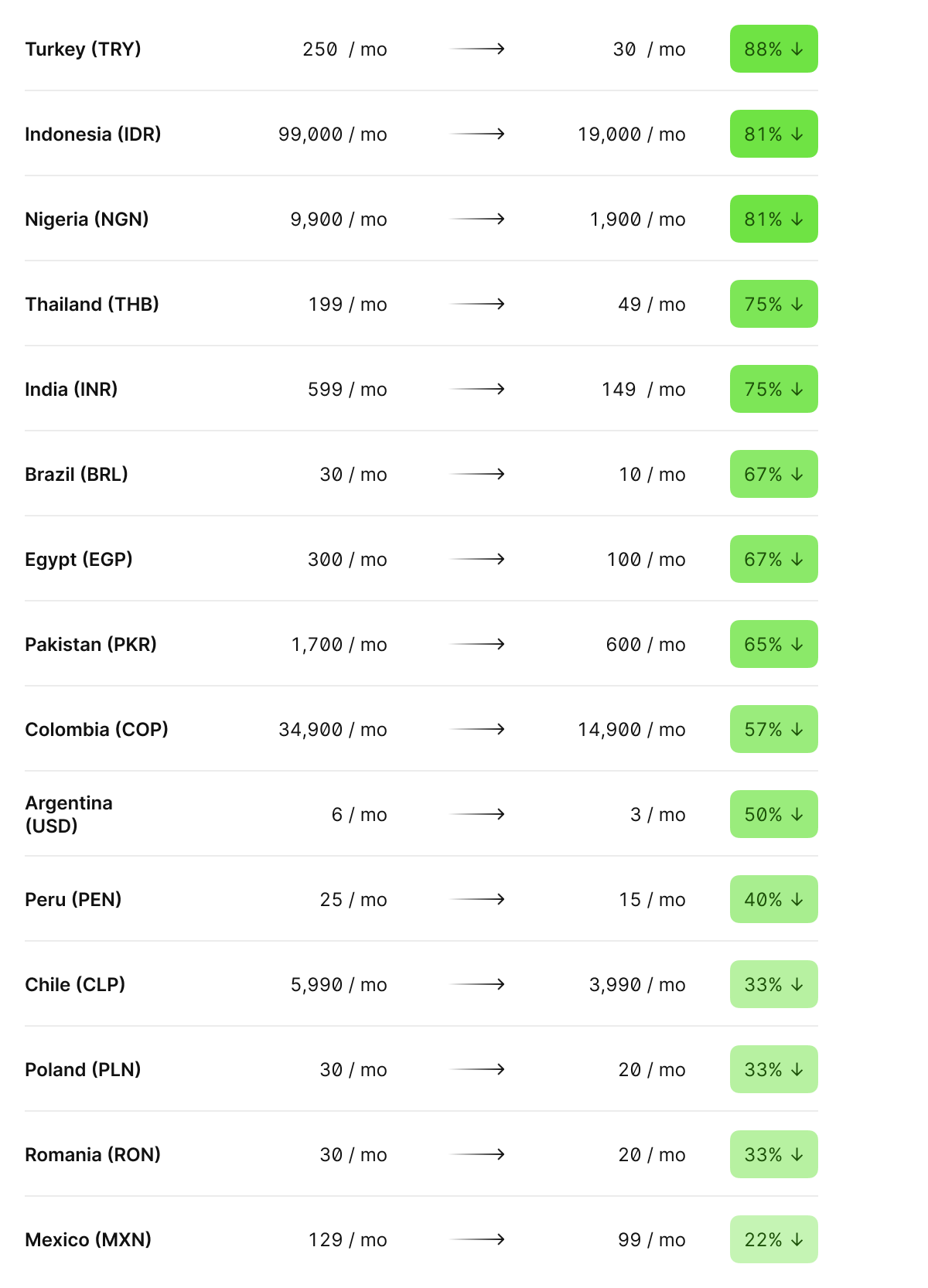
<p>In order to make things right, we are significantly reducing the price of Instapaper Premium on the App Store and Google Play in the following countries:</p>

<p><img src="/img/international-pricing.png" alt="" /></p>

<p>The new prices will go into effect Thursday August 7th on both iOS App Store and Google Play. On iOS App Store, existing Premium subscriptions will renew at the new price points. On Google Play, new price points are only in effect for new subscriptions, and you can cancel/resubscribe to get the lower rates.</p>

<p>Our goal with Instapaper is to build a long-term, sustainable business that brings the best reading tools to everyone at an affordable price point. The prices above more accurately reflect that intent, and we’re happy to rectify this mistake.</p>

<p>As always, our work is informed by your feature requests and bug reports. Please don’t hesitate to reach out to us at <a href="http://instapaper.com/">support@instapaper.com</a> if you have any feedback!</p>

<p>– Instapaper Team</p>]]></content><author><name></name></author><category term="Pricing" /><summary type="html"><![CDATA[]]></summary><media:thumbnail xmlns:media="http://search.yahoo.com/mrss/" url="/img/pdf_beta.png" /><media:content medium="image" url="/img/pdf_beta.png" xmlns:media="http://search.yahoo.com/mrss/" /></entry><entry><title type="html">Instapaper Rakuten Kobo Integration</title><link href="/post/789685899750424576/instapaper-rakuten-kobo-integration" rel="alternate" type="text/html" title="Instapaper Rakuten Kobo Integration" /><published>2025-07-21T10:06:00+00:00</published><updated>2025-07-21T10:06:00+00:00</updated><id>/post/789685899750424576/instapaper-rakuten-kobo-integration</id><content type="html" xml:base="/post/789685899750424576/instapaper-rakuten-kobo-integration"><![CDATA[<p><img src="/img/instapaper-kobo.png" alt="" /></p>

<p>We’re excited to announce a new integration that will bring Instapaper to all <a href="https://click.linksynergy.com/fs-bin/click?id=sYIs%2a2Ukl2A&amp;offerid=1562891.1483&amp;type=3&amp;subid=0">Rakuten Kobo eReaders</a>. The integration will provide Kobo readers with a seamless way to save and read web articles directly on their Kobo eReaders.</p>

<p>In close partnership with Kobo, we’re working diligently on the integration, and we’re aiming to launch at the end of this summer. The new Kobo Instapaper integration will replace Kobo’s previous integration with Pocket which shut down earlier this month.</p>

<p>Since the Pocket shutdown, our top priority has been to help Pocket users migrate to Instapaper. Pocket users who have made the switch praise Instapaper on its clean, distraction-free reading experience, and robust organization tools.</p>

<p>We’re excited to be partnered closely with Rakuten Kobo to power the read-it-later functionality on their Kobo eReader devices!</p>

<p><strong>Importing from Pocket</strong></p>

<p><img src="/img/instapaper-pocket.png" alt="" /></p>

<p>If you’re a former Pocket user, you can import your articles into Instapaper in 2-clicks at <a href="http://instapaper.com/pocket">instapaper.com/pocket</a>.</p>

<p>Alternatively, you can <a href="https://getpocket.com/export">download your Pocket export file</a> and import to <a href="https://www.instapaper.com/user">Instapaper Settings</a>.</p>

<p>As always, if you have any questions, concerns, or requests, you can reach us at <a href="http://instapaper.com/">support@instapaper.com</a>. We look forward to hearing from you!</p>

<p>– Instapaper Team</p>]]></content><author><name></name></author><category term="Announcements" /><summary type="html"><![CDATA[]]></summary><media:thumbnail xmlns:media="http://search.yahoo.com/mrss/" url="/img/instapaper-kobo.png" /><media:content medium="image" url="/img/instapaper-kobo.png" xmlns:media="http://search.yahoo.com/mrss/" /></entry><entry><title type="html">PDF Beta, TTS Fixes on iOS, and Logged-In Sites on Android</title><link href="/post/781539710965301248/pdf-beta-tts-fixes-on-ios-and-logged-in-sites-on" rel="alternate" type="text/html" title="PDF Beta, TTS Fixes on iOS, and Logged-In Sites on Android" /><published>2025-04-22T12:05:49+00:00</published><updated>2025-04-22T12:05:49+00:00</updated><id>/post/781539710965301248/pdf-beta-tts-fixes-on-ios-and-logged-in-sites-on</id><content type="html" xml:base="/post/781539710965301248/pdf-beta-tts-fixes-on-ios-and-logged-in-sites-on"><![CDATA[<p>Today, we’re launching a few updates to Instapaper including a public beta for PDFs, text-to-speech fixes on iOS, and support for Logged-In Sites on Android.</p>

<h2 id="pdf-beta"><strong>PDF Beta</strong></h2>

<p><img src="/img/pdf_beta.png" alt="" /></p>

<p>For years, we’ve been at work building a PDF Parser that is up to our standards for great reading experiences. Now that we’re closing in on a PDF Parser that focuses on delivering the best reading experience for PDFs, especially on mobile devices, we’re ready to onboard beta testers so we can continue refining the experience.</p>

<p>If you’re interested in joining the PDF Beta, please send an email to <a href="http://instapaper.com/">support@instapaper.com</a> from your Instapaper login email (or include it in the email). We’re going to add the first 100 people that reach out to the beta, and we’ll send you the instructions to get started in a reply.</p>

<p>We’re really excited about our new PDF Parser. It’s one of the biggest leaps we’ve made with Instapaper recently, and we look forward to hearing your feedback!</p>

<h2 id="ios-92-text-to-speech-fixes"><strong>iOS 9.2: Text-to-Speech Fixes</strong></h2>

<p>We rewrote Instapaper’s text-to-speech integration to fix some longstanding issues where the voice skipped or restarted, especially on larger articles. In our testing, this resolved issues across many of the provided voices on iOS, and we’ve received a lot of positive feedback from testers.</p>

<p>We’re working on more improvements to Text-to-Speech on Instapaper, including fixing issues with wireless CarPlay, adding more text-to-speech voices, and re-writing the interface for text-to-speech. If you’re interested in helping to beta test any of those, please reach out to <a href="http://instapaper.com/">support@instapaper.com</a> and we’ll let you know when it’s ready!</p>

<h2 id="android-62-logged-in-sites-support"><strong>Android 6.2: Logged-In Sites Support</strong></h2>

<p><img src="/img/android_loggedin_sites.png" alt="" /></p>

<p>On Instapaper Android, you can now sign in to websites directly within the app. When you’re logged into sites, Instapaper can more reliably retrieve and display complete articles, especially for websites with paywalls. You can learn more on the <a href="https://blog.instapaper.com/post/774564490310205440/instapaper-ios-91-logged-in-sites-paywall">Logged-In Sites Launch Post</a>.</p>

<p>To get started, navigate to Settings &gt; Logged-In Sites &gt; Navigate to website &gt; Login with your credentials &gt; Tap “Save Login”.</p>

<p>As always, our work is informed by your feature requests and bug reports. Please don’t hesitate to reach out to us at <a href="http://instapaper.com/">support@instapaper.com</a> if you have any feedback!</p>

<p>– Instapaper Team</p>]]></content><author><name></name></author><category term="Features" /><summary type="html"><![CDATA[Today, we’re launching a few updates to Instapaper including a public beta for PDFs, text-to-speech fixes on iOS, and support for Logged-In Sites on Android.]]></summary><media:thumbnail xmlns:media="http://search.yahoo.com/mrss/" url="/img/pdf_beta.png" /><media:content medium="image" url="/img/pdf_beta.png" xmlns:media="http://search.yahoo.com/mrss/" /></entry><entry><title type="html">Instapaper 9.1: Logged-In Sites, Paywall Detection, and Settings Redesign</title><link href="/post/774564490310205440/instapaper-ios-91-logged-in-sites-paywall" rel="alternate" type="text/html" title="Instapaper 9.1: Logged-In Sites, Paywall Detection, and Settings Redesign" /><published>2025-02-04T12:17:40+00:00</published><updated>2025-02-04T12:17:40+00:00</updated><id>/post/774564490310205440/instapaper-ios-91-logged-in-sites-paywall</id><content type="html" xml:base="/post/774564490310205440/instapaper-ios-91-logged-in-sites-paywall"><![CDATA[<p>Today, we’re launching Instapaper 9.1 for iOS and macOS, which includes support for Logged-In Sites, Paywall Detection, Settings Redesign, and more.</p>

<p><strong>Logged-In Sites</strong></p>

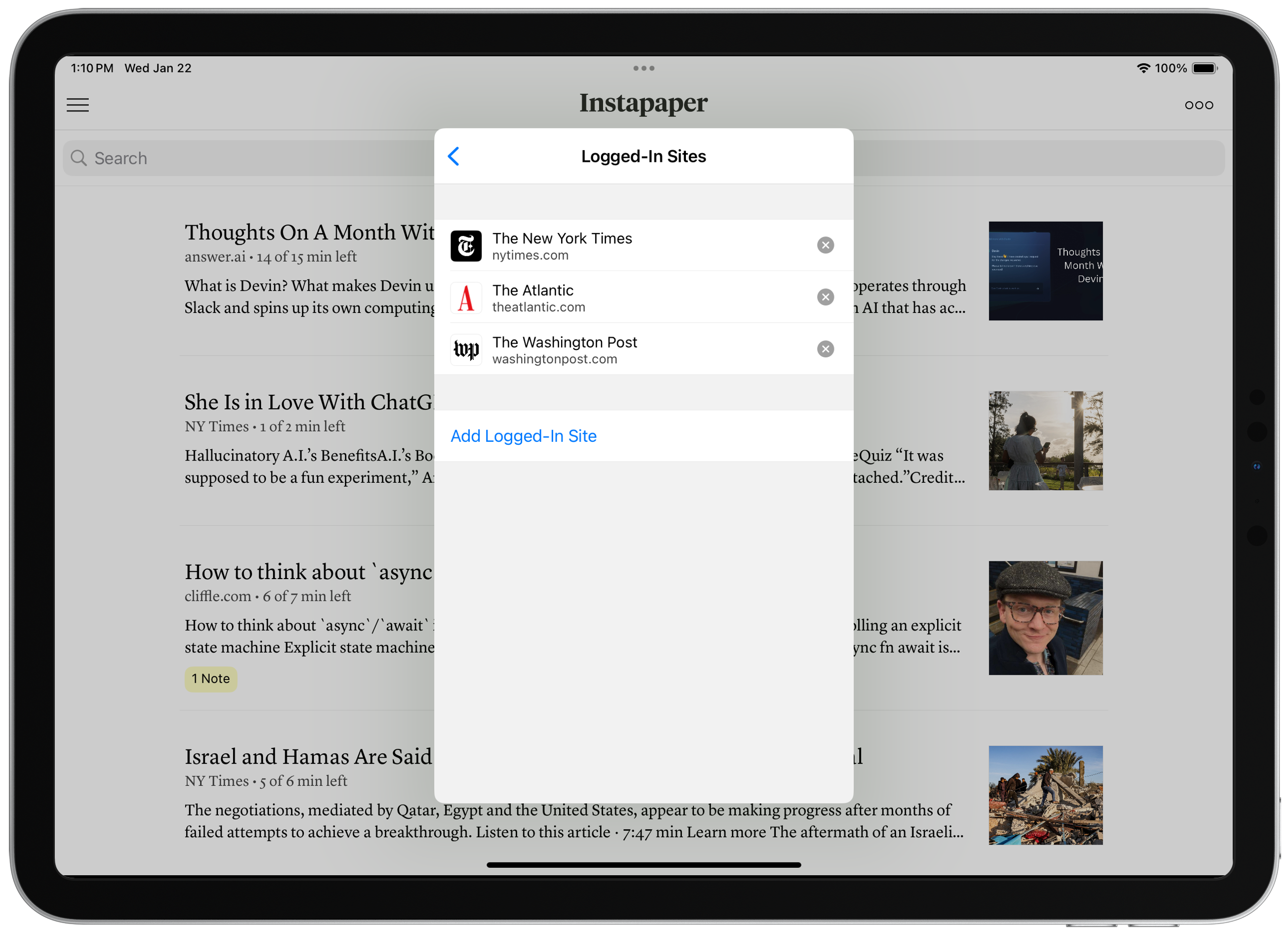
<p><img src="/img/logged_in_sites.png" alt="" /></p>

<p>On Instapaper iOS and macOS, you can now sign in to websites directly within the app. When you’re logged into sites, Instapaper can more reliably retrieve and display complete articles.</p>

<p>Increasingly, we’re seeing more “hard paywalls” across the Internet, where publishers are preventing third parties from accessing content. Sometimes, this results in Instapaper only receiving part of an article and, other times, Instapaper is completely blocked from accessing any information including basic metadata (i.e. title, author, image thumbnail, etc.).</p>

<p>We support publishers in serving their content however they’d like. That said, paid subscribers of those publishers should be able to access that content in whichever browsers, apps, or user-agents they’d like. </p>

<p>To get started, navigate to Settings &gt; Logged-In Sites &gt; Navigate to website &gt; Login with your credentials &gt; Tap “Save Login”.</p>

<p>As a reminder, you can long press an article in the list to redownload it, or save new articles to get the full content.</p>

<p><strong>Paywall Detection</strong></p>

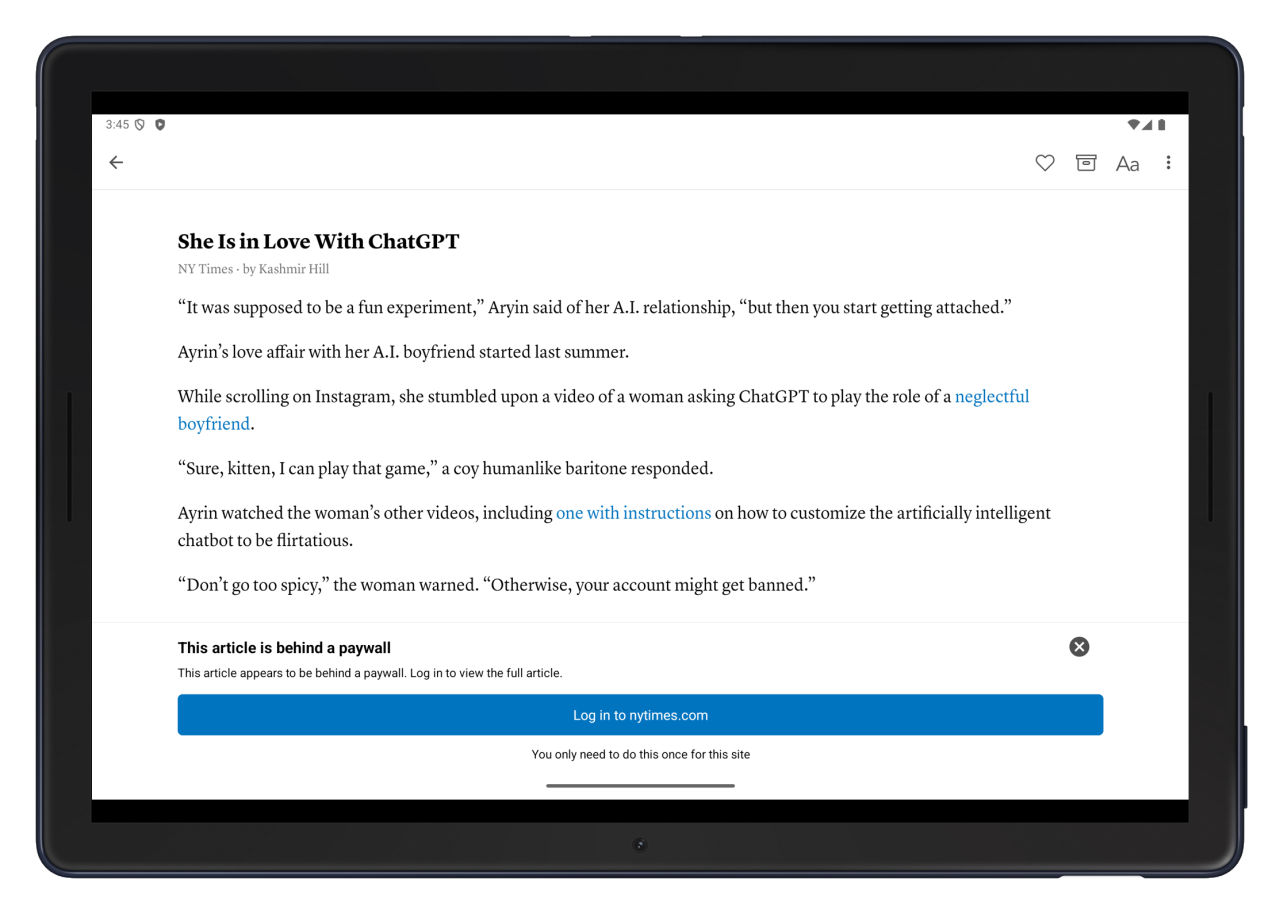
<p><img src="/img/paywall_notice.png" alt="" /></p>

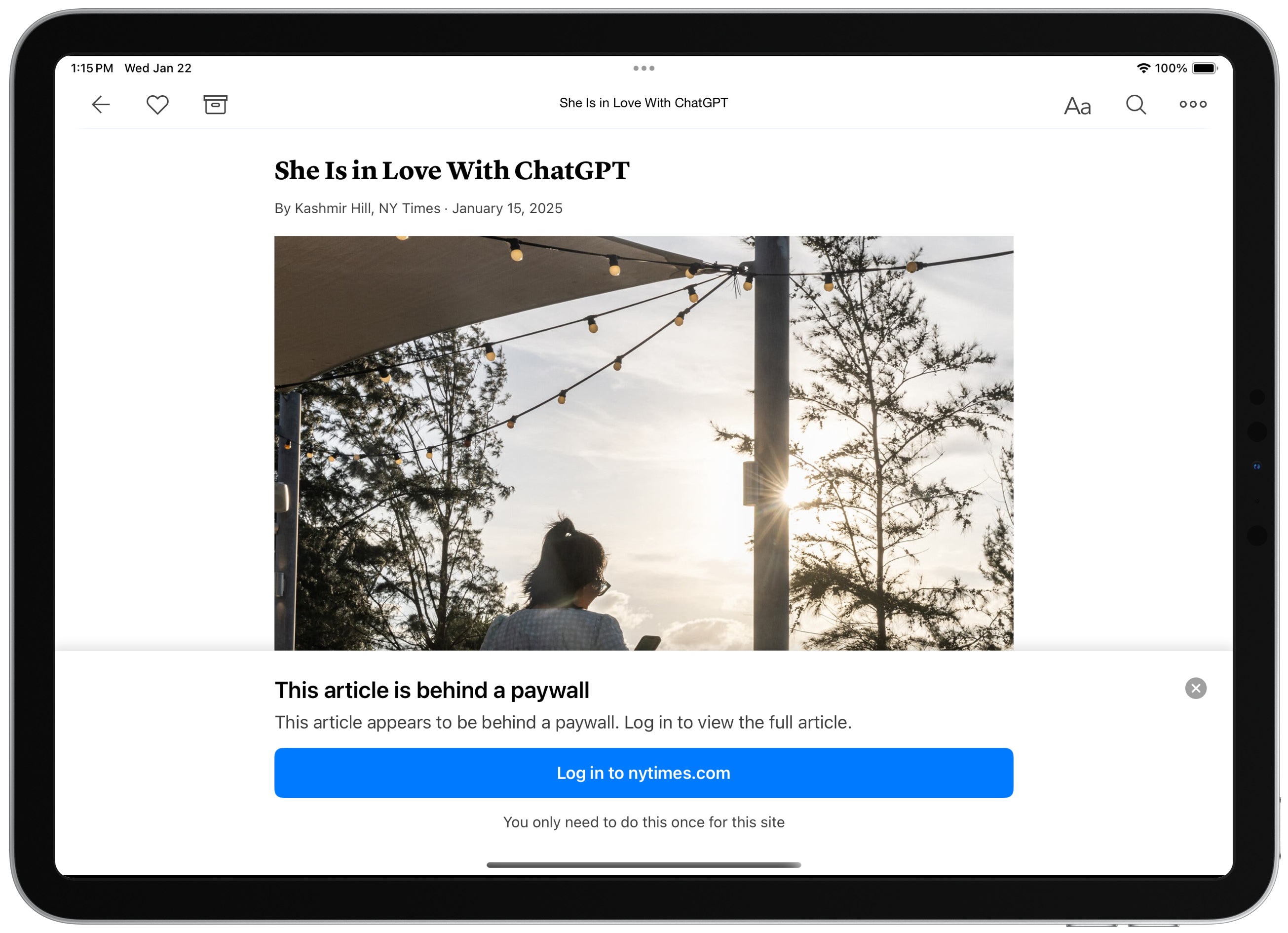
<p>Our article parsers now detect paywalls and provide instructions for accessing the complete content when you have a subscription.</p>

<p>On iOS and macOS, you can use Logged-In Sites in order to access the paywalled content, and we prompt you to login to the website directly from the paywall notice.</p>

<p>On <a href="https://www.instapaper.com/">Instapaper.com</a>, the best way to access the full content for a paywalled site is to open the article, ensure you’re logged in to the website, and use one of our <a href="https://www.instapaper.com/save">browser extensions</a> to save the article.</p>

<p><strong>Settings Redesign</strong></p>

<p><img src="/img/settings_redesign.png" alt="" /></p>

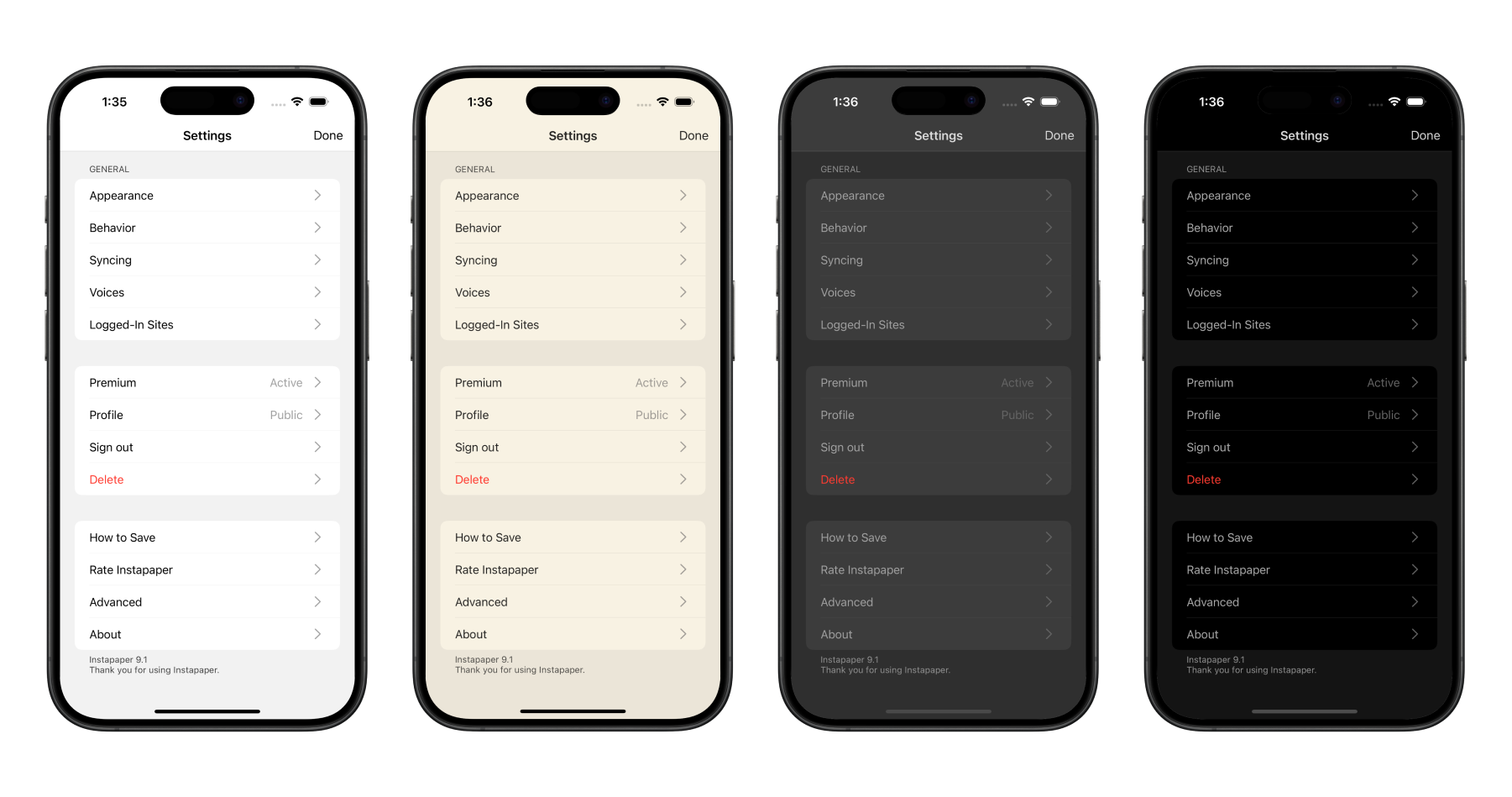
<p>We re-wrote Settings on iOS and macOS to conform to the app theme, improve the organization of Settings pages, and make it easier for our team to add and manage Settings.</p>

<p>We also added three new settings in Settings &gt; Behavior to customize Instapaper further:</p>

<ol>
  <li><strong>Save Delay:</strong> Adjusts the amount of time that the Save screen shows. You can set this to “None” to have it disappear as quickly as possible.</li>
  <li><strong>Auto-Lock:</strong> Prevents your screen from locking in reader when disabled.</li>
  <li><strong>Line Breaks in Code:</strong> Prevents line breaks in code blocks when disabled.</li>
</ol>

<p><strong>Other Improvements</strong></p>

<p>We’re also launching a number of other fixes and improvements, including…</p>

<ul>
  <li>Fixed issue where article information was not showing on lock screen when using text-to-speech Playlists.</li>
  <li>Improved Full Screen Image Viewer on all platforms, but big improvements to iPad and macOS.</li>
  <li>Improvements to device rotation on iPad, and reduced crashing.</li>
  <li>Other minor fixes and improvements.</li>
</ul>

<p>We’re in the process of building Logged-In Sites support on Android, if you’d like to help beta test please drop us an email at <a href="http://instapaper.com/">support@instapaper.com</a></p>

<p>As always, our roadmap is informed by your feature requests and bug reports. Please don’t hesitate to reach out to <a href="http://instapaper.com/">support@instapaper.com</a> with any requests, questions, or concerns.</p>

<p>– Instapaper Team</p>]]></content><author><name></name></author><category term="Features" /><summary type="html"><![CDATA[Today, we’re launching Instapaper 9.1 for iOS and macOS, which includes support for Logged-In Sites, Paywall Detection, Settings Redesign, and more.]]></summary><media:thumbnail xmlns:media="http://search.yahoo.com/mrss/" url="/img/logged_in_sites.png" /><media:content medium="image" url="/img/logged_in_sites.png" xmlns:media="http://search.yahoo.com/mrss/" /></entry><entry><title type="html">Instapaper Android 6.1: View Notes, Multiselect Tagging, and More!</title><link href="/post/772844182708568064/instapaper-android-61-view-notes-multiselect" rel="alternate" type="text/html" title="Instapaper Android 6.1: View Notes, Multiselect Tagging, and More!" /><published>2025-01-16T12:34:07+00:00</published><updated>2025-01-16T12:34:07+00:00</updated><id>/post/772844182708568064/instapaper-android-61-view-notes-multiselect</id><content type="html" xml:base="/post/772844182708568064/instapaper-android-61-view-notes-multiselect"><![CDATA[<p>Happy new year! Today we’re excited to launch <a href="https://play.google.com/store/apps/details?id=com.instapaper.android&amp;hl=en_US&amp;pli=1">Instapaper Android 6.1</a>, which includes View Notes to make it easy to view an article’s notes in one place, multiselect tagging for better bulk organizing of your articles with tags, and a few more features and improvements.</p>

<p><strong>View Notes</strong></p>

<p><img src="/img/android-6-1-view-notes.png" alt="" /></p>

<p>Easily view your highlights and notes on an article by tapping the Notes button in the article list, or by opening an article, tapping the more button, and tap “View Notes”.</p>

<p>From there, you can easily export your notes on an article in plain text, markdown, or HTML. Additionally, you can easily navigate to each note within the article.</p>

<p><strong>Multiselect Tagging</strong></p>

<p><img src="/img/android-6-1-multiselect.png" alt="" /></p>

<p>We added multiselect tagging in Instapaper Android 6.1 to make it much easier to organize your articles with tags in bulk. You can start multiselect by long pressing an article, select the articles you want to add tags to, and then tap the tag icon.</p>

<p><strong>Other Features &amp; Improvements</strong></p>

<p>In addition to the above, Instapaper Android 6.1 has a handful of additional features and improvements:</p>

<ul>
  <li>Added <a href="https://opendyslexic.org/">OpenDyslexic</a> font for readers with dyslexia.</li>
  <li>Improved experience for e-ink readers by disabling more animations.</li>
  <li>Fixed bug where screen would not lock with reader open.</li>
  <li>Fixed issue where video thumbnails would show up duplicated.</li>
  <li>Other minor crash fixes and improvements.</li>
</ul>

<p>We’re excited to continue improving the Android app, and getting it up to parity with iOS and web. Please let us know if you have any feature requests, bug reports, or improvements you’d like to see on Android!</p>

<p>– Instapaper Team</p>]]></content><author><name></name></author><category term="Features" /><summary type="html"><![CDATA[Happy new year! Today we’re excited to launch Instapaper Android 6.1, which includes View Notes to make it easy to view an article’s notes in one place, multiselect tagging for better bulk organizing of your articles with tags, and a few more features and improvements.]]></summary><media:thumbnail xmlns:media="http://search.yahoo.com/mrss/" url="/img/android-6-1-view-notes.png" /><media:content medium="image" url="/img/android-6-1-view-notes.png" xmlns:media="http://search.yahoo.com/mrss/" /></entry></feed>