<?xml version="1.0" encoding="utf-8"?><feed xmlns="http://www.w3.org/2005/Atom" ><generator uri="https://jekyllrb.com/" version="3.10.0">Jekyll</generator><link href="/rss" rel="self" type="application/atom+xml" /><link href="/" rel="alternate" type="text/html" /><updated>2026-03-31T16:52:34+00:00</updated><id>/rss</id><title type="html">Instapaper Blog</title><subtitle>Product updates, company announcements, and posts from the team building your favorite save-for-later app.</subtitle><entry><title type="html">Relaunching the Instaparser API</title><link href="/blog/2026/03/31/relaunching-the-instaparser-api/" rel="alternate" type="text/html" title="Relaunching the Instaparser API" /><published>2026-03-31T14:30:00+00:00</published><updated>2026-03-31T14:30:00+00:00</updated><id>/blog/2026/03/31/relaunching-the-instaparser-api</id><content type="html" xml:base="/blog/2026/03/31/relaunching-the-instaparser-api/"><![CDATA[<p><img src="/img/instaparser.svg" alt="" /></p>

<p>Ten years ago, we <a href="http://blog.instapaper.com/post/142296652536">launched the Instaparser API</a> to give developers access to the same parsing technology that powers Instapaper. Since then, the web has changed dramatically — PDFs are everywhere, LLMs need clean input, and developers need structured content more than ever.</p>

<p>Today, we’re relaunching <a href="https://instaparser.com">Instaparser</a> with three APIs built and refined on Instapaper:</p>

<ul>
  <li><a href="https://instaparser.com/docs/1/article">Article Extraction</a></li>
  <li><a href="https://instaparser.com/docs/1/pdf">PDF Parsing</a></li>
  <li><a href="https://instaparser.com/docs/1/summary">Summarization</a></li>
</ul>

<p>All three are included in every plan, including the free tier which provides 1,000 API credits per month.</p>

<h2 id="article-extraction">Article Extraction</h2>

<p>The Article API is what powers Instapaper’s reader, and it extracts clean, structured content from any URL — title, author, date, body text, images, and metadata. Just pass a URL and get content back as structured JSON, and output the article body as html, text, or markdown.</p>

<div class="language-bash highlighter-rouge"><div class="highlight"><pre class="highlight"><code>curl <span class="s2">"https://instaparser.com/api/1/article"</span> <span class="se">\</span>
  <span class="nt">-H</span> <span class="s2">"Authorization: Bearer YOUR_API_KEY"</span> <span class="se">\</span>
  <span class="nt">-H</span> <span class="s2">"Content-Type: application/json"</span> <span class="se">\</span>
  <span class="nt">-d</span> <span class="s1">'{"url": "https://example.com/post"}'</span>
</code></pre></div></div>

<div class="language-json highlighter-rouge"><div class="highlight"><pre class="highlight"><code><span class="p">{</span><span class="w">
  </span><span class="nl">"title"</span><span class="p">:</span><span class="w"> </span><span class="s2">"How We Built Our Search Engine"</span><span class="p">,</span><span class="w">
  </span><span class="nl">"author"</span><span class="p">:</span><span class="w"> </span><span class="s2">"Jane Kim"</span><span class="p">,</span><span class="w">
  </span><span class="nl">"date"</span><span class="p">:</span><span class="w"> </span><span class="s2">"2026-02-15T09:00:00Z"</span><span class="p">,</span><span class="w">
  </span><span class="nl">"content"</span><span class="p">:</span><span class="w"> </span><span class="s2">"&lt;p&gt;Clean, structured HTML of the article body...&lt;/p&gt;"</span><span class="p">,</span><span class="w">
  </span><span class="nl">"word_count"</span><span class="p">:</span><span class="w"> </span><span class="mi">1847</span><span class="p">,</span><span class="w">
  </span><span class="nl">"thumbnail"</span><span class="p">:</span><span class="w"> </span><span class="s2">"https://example.com/images/hero.jpg"</span><span class="p">,</span><span class="w">
  </span><span class="nl">"excerpt"</span><span class="p">:</span><span class="w"> </span><span class="s2">"A deep dive into building search infrastructure..."</span><span class="w">
</span><span class="p">}</span><span class="w">
</span></code></pre></div></div>

<p><strong>What you can build with it:</strong></p>

<ul>
  <li><strong>Personal article archive</strong>: Extract articles and save them as markdown files on your computer for offline reading or long-term archival.</li>
  <li><strong>Content aggregation</strong>: Pull article content into newsletters, digests, or feeds without dealing with inconsistent HTML.</li>
  <li><strong>RAG pipelines</strong>: Feed clean, structured web content directly into retrieval-augmented generation workflows.</li>
</ul>

<h2 id="pdf-parsing">PDF Parsing</h2>

<p>Upload a PDF or pass a URL to a hosted PDF. Instaparser handles scanned documents, multi-column layouts, and tables. The API generates images for PDF figures, and output the document as html, text, or markdown.</p>

<div class="language-bash highlighter-rouge"><div class="highlight"><pre class="highlight"><code>curl <span class="s2">"https://instaparser.com/api/1/pdf?url=https://example.com/paper.pdf"</span> <span class="se">\</span>
  <span class="nt">-H</span> <span class="s2">"Authorization: Bearer YOUR_API_KEY"</span>
</code></pre></div></div>

<p>We’ve been building our <a href="https://blog.instapaper.com/post/791134578856378368/pdf-support-localization-and-international">PDF parser</a> for Instapaper over the past couple of years, and with the Instaparser API you can now use it in your own applications.</p>

<p><strong>What you can build with it:</strong></p>

<ul>
  <li><strong>LLM input</strong>: Convert PDFs to clean text for use as context in large language models, without wrestling with parsing libraries or losing document structure.</li>
  <li><strong>Figure and table extraction</strong>: Pull structured content from research papers or financial reports for downstream analysis or visualization.</li>
  <li><strong>Document processing</strong>: Automate extraction from legal filings, academic papers, or internal documents at scale.</li>
</ul>

<h2 id="summarization">Summarization</h2>

<p>The Summary API returns a concise summary of a URL with a single API call. The Summary API extracts key sentences and generates a summary from the page content — useful for previews, context compression, and content curation.</p>

<div class="language-bash highlighter-rouge"><div class="highlight"><pre class="highlight"><code>curl <span class="s2">"https://instaparser.com/api/1/summary"</span> <span class="se">\</span>
  <span class="nt">-H</span> <span class="s2">"Authorization: Bearer YOUR_API_KEY"</span> <span class="se">\</span>
  <span class="nt">-H</span> <span class="s2">"Content-Type: application/json"</span> <span class="se">\</span>
  <span class="nt">-d</span> <span class="s1">'{"url": "https://example.com/long-article"}'</span>
</code></pre></div></div>

<p><strong>What you can build with it:</strong></p>

<ul>
  <li><strong>Link previews</strong>: Generate rich preview cards with meaningful summaries instead of truncated meta descriptions.</li>
  <li><strong>Content curation</strong>: Quickly assess whether an article is worth a full read by reviewing its key sentences.</li>
  <li><strong>LLM context compression</strong>: Trim long articles down to their essential points before passing them into context windows, reducing token costs.</li>
  <li><strong>Email digests</strong>: Summarize a collection of articles into a digestible newsletter or daily roundup.</li>
</ul>

<h2 id="getting-started">Getting Started</h2>

<p>All three APIs are included in every Instaparser plan, including the free tier. <a href="https://instaparser.com/pricing">Sign up for an API key</a> and start making requests in minutes.</p>

<p>We offer official SDKs for Python and Node.js, or you can use the REST API directly with curl or any HTTP client.</p>

<p><strong>Python</strong></p>

<div class="language-bash highlighter-rouge"><div class="highlight"><pre class="highlight"><code>pip <span class="nb">install </span>instaparser
</code></pre></div></div>

<div class="language-python highlighter-rouge"><div class="highlight"><pre class="highlight"><code><span class="kn">from</span> <span class="nn">instaparser</span> <span class="kn">import</span> <span class="n">InstaparserClient</span>

<span class="n">client</span> <span class="o">=</span> <span class="n">InstaparserClient</span><span class="p">(</span><span class="s">"YOUR_API_KEY"</span><span class="p">)</span>
<span class="n">article</span> <span class="o">=</span> <span class="n">client</span><span class="p">.</span><span class="n">Article</span><span class="p">(</span><span class="s">"https://example.com/post"</span><span class="p">)</span>
<span class="k">print</span><span class="p">(</span><span class="n">article</span><span class="p">.</span><span class="n">title</span><span class="p">)</span>    <span class="c1"># "How We Built Our Search Engine"
</span><span class="k">print</span><span class="p">(</span><span class="n">article</span><span class="p">.</span><span class="n">content</span><span class="p">)</span>  <span class="c1"># "&lt;p&gt;Clean, structured HTML...&lt;/p&gt;"
</span></code></pre></div></div>

<p><strong>Node.js</strong></p>

<div class="language-bash highlighter-rouge"><div class="highlight"><pre class="highlight"><code>npm <span class="nb">install </span>instaparser-api
</code></pre></div></div>

<div class="language-javascript highlighter-rouge"><div class="highlight"><pre class="highlight"><code><span class="k">import</span> <span class="p">{</span> <span class="nx">InstaparserClient</span> <span class="p">}</span> <span class="k">from</span> <span class="dl">'</span><span class="s1">instaparser-api</span><span class="dl">'</span><span class="p">;</span>

<span class="kd">const</span> <span class="nx">client</span> <span class="o">=</span> <span class="k">new</span> <span class="nx">InstaparserClient</span><span class="p">({</span> <span class="na">apiKey</span><span class="p">:</span> <span class="dl">'</span><span class="s1">YOUR_API_KEY</span><span class="dl">'</span> <span class="p">});</span>
<span class="kd">const</span> <span class="nx">article</span> <span class="o">=</span> <span class="k">await</span> <span class="nx">client</span><span class="p">.</span><span class="nx">article</span><span class="p">({</span> <span class="na">url</span><span class="p">:</span> <span class="dl">'</span><span class="s1">https://example.com/post</span><span class="dl">'</span> <span class="p">});</span>
<span class="nx">console</span><span class="p">.</span><span class="nx">log</span><span class="p">(</span><span class="nx">article</span><span class="p">.</span><span class="nx">title</span><span class="p">);</span>   <span class="c1">// "How We Built Our Search Engine"</span>
<span class="nx">console</span><span class="p">.</span><span class="nx">log</span><span class="p">(</span><span class="nx">article</span><span class="p">.</span><span class="nx">content</span><span class="p">);</span> <span class="c1">// "&lt;p&gt;Clean, structured HTML...&lt;/p&gt;"</span>
</code></pre></div></div>

<p><strong>curl</strong></p>

<div class="language-bash highlighter-rouge"><div class="highlight"><pre class="highlight"><code>curl <span class="s2">"https://instaparser.com/api/1/article"</span> <span class="se">\</span>
  <span class="nt">-H</span> <span class="s2">"Authorization: Bearer YOUR_API_KEY"</span> <span class="se">\</span>
  <span class="nt">-H</span> <span class="s2">"Content-Type: application/json"</span> <span class="se">\</span>
  <span class="nt">-d</span> <span class="s1">'{"url": "https://example.com/post"}'</span>
</code></pre></div></div>

<h2 id="no-code--ai-integrations">No-Code &amp; AI Integrations</h2>

<p>Instaparser is also available through popular no-code and AI platforms:</p>

<ul>
  <li><strong>Claude Code</strong>: Add Instaparser as a plugin to give Claude the ability to use Instaparser to extract and summarize content during conversations.
    <div class="language-bash highlighter-rouge"><div class="highlight"><pre class="highlight"><code><span class="o">&gt;</span> /plugin marketplace add instapaper/instaparser-claude-plugin 
<span class="o">&gt;</span> /plugin <span class="nb">install </span>instaparser
<span class="o">&gt;</span> /reload-plugins
<span class="o">&gt;</span> Instaparser extract PDF from https://bitcoin.org/bitcoin.pdf and write to markdown file 
</code></pre></div>    </div>
  </li>
  <li><strong>OpenClaw</strong>: Use Instaparser as a document loader to feed clean, structured web content into your LangChain pipelines.
    <div class="language-bash highlighter-rouge"><div class="highlight"><pre class="highlight"><code>openclaw skills <span class="nb">install </span>instaparser
</code></pre></div>    </div>
  </li>
  <li><strong>n8n</strong>: Use the Instaparser node to extract articles, parse PDFs, and summarize content as part of your automation workflows.
    <ul>
      <li>We hoped to have the <a href="https://www.npmjs.com/package/n8n-nodes-instaparser">Instaparser n8n node</a> ready for launch, but it’s still in review by n8n.</li>
      <li>If you manage a local n8n instance, you can install the Instaparser n8n node by following <a href="https://docs.n8n.io/integrations/community-nodes/installation/gui-install/">these instructions</a>.</li>
    </ul>
  </li>
</ul>

<p>We’re actively working on more integrations. If there’s a platform you’d like to see Instaparser on, let us know at <a href="mailto:support@instaparser.com">support@instaparser.com</a>.</p>

<h2 id="pricing">Pricing</h2>

<p>All plans include access to all three APIs. No per-feature charges or credit multipliers.</p>

<table>
  <thead>
    <tr>
      <th>Plan</th>
      <th>Price</th>
      <th>Monthly Credits</th>
      <th>Rate Limit</th>
    </tr>
  </thead>
  <tbody>
    <tr>
      <td><strong>Trial</strong></td>
      <td>Free</td>
      <td>1,000</td>
      <td>1 req/sec</td>
    </tr>
    <tr>
      <td><strong>Beta</strong></td>
      <td>$150/mo</td>
      <td>100,000</td>
      <td>5 req/sec</td>
    </tr>
    <tr>
      <td><strong>Live</strong></td>
      <td>$500/mo</td>
      <td>500,000</td>
      <td>25 req/sec</td>
    </tr>
    <tr>
      <td><strong>Scale</strong></td>
      <td>$900/mo</td>
      <td>1,000,000</td>
      <td>50 req/sec</td>
    </tr>
    <tr>
      <td><strong>Enterprise</strong></td>
      <td>Custom</td>
      <td>10M+</td>
      <td>Unlimited</td>
    </tr>
  </tbody>
</table>

<p>Paid plans include overage pricing so you never hit a wall mid-workflow. Full pricing details are available at <a href="https://instaparser.com/pricing">instaparser.com/pricing</a>. For Enterprise or custom volume requirements, contact us at <a href="mailto:support@instaparser.com">support@instaparser.com</a>.</p>

<h2 id="built-on-15-years-of-parsing">Built on 15+ Years of Parsing</h2>

<p>Instaparser isn’t a new product — it’s built on the same engine that has powered Instapaper’s reading experience since 2008, refined across billions of articles. The edge cases you’ll encounter parsing the messy, modern web, we’ve already solved.</p>

<p>We’re excited to open this up to developers again and can’t wait to see what you build. If you have any questions, feedback, or want to share what you’re working on, reach out to <a href="mailto:support@instaparser.com">support@instaparser.com</a>.</p>

<p><a href="https://instaparser.com/pricing">Get your API key →</a></p>

<p>– Instapaper Team</p>]]></content><author><name></name></author><category term="API" /><summary type="html"><![CDATA[]]></summary><media:thumbnail xmlns:media="http://search.yahoo.com/mrss/" url="/img/instaparser.svg" /><media:content medium="image" url="/img/instaparser.svg" xmlns:media="http://search.yahoo.com/mrss/" /></entry><entry><title type="html">AI Voices, Text-to-Speech Redesign, and Android Update</title><link href="/post/802011928668094464/ai-voices-text-to-speech-redesign-and-android" rel="alternate" type="text/html" title="AI Voices, Text-to-Speech Redesign, and Android Update" /><published>2025-12-04T11:22:57+00:00</published><updated>2025-12-04T11:22:57+00:00</updated><id>/post/802011928668094464/ai-voices-text-to-speech-redesign-and-android</id><content type="html" xml:base="/post/802011928668094464/ai-voices-text-to-speech-redesign-and-android"><![CDATA[<p>Today, we’re excited to launch AI Voices, which are high-quality, streaming text-to-speech voices. We’ve completely redesigned the text-to-speech player to make it more modern and intuitive. Lastly, we’re launching a major Android update with an improved search experience and a number of other features.</p>

<h2 id="ai-voices"><strong>AI Voices</strong></h2>

<p>Instapaper has supported <a href="https://blog.instapaper.com/post/97750859246">text-to-speech for over 10 years</a>, leveraging system voices available from iOS and Android. The state of the art has improved significantly since we first launch text-to-speech, and we’re excited to launch 17 high-quality text-to-speech voices across the following languages and accents:</p>

<ul>
  <li>English (US)</li>
  <li>English (UK)</li>
  <li>Chinese</li>
  <li>French</li>
  <li>Italian</li>
  <li>Japanese</li>
  <li>Hindi</li>
  <li>Spanish</li>
  <li>Portuguese</li>
</ul>

<p>Below you can listen to the first paragraph of this post with a System Voice versus the new AI Voice:</p>

<p><strong>System Voice</strong> <strong>(Samantha)</strong></p>

<audio controls="controls"><source src="https://embed.instapaper.com/blog/blog_sam.mp3" type="audio/mpeg" />&lt;/source&gt;</audio>

<p><strong>AI Voice</strong> <strong>(Grace)</strong></p>

<audio controls="controls"><source src="https://embed.instapaper.com/blog/blog_grace.mp3" type="audio/mpeg" />&lt;/source&gt;</audio>

<p>AI Voices are available on Instapaper iOS 9.4 with a <a href="https://instapaper.com/premium">Premium subscription</a>. Android support will be coming soon!</p>

<h2 id="text-to-speech-redesign"><strong>Text-to-Speech Redesign</strong></h2>

<p><img src="/img/tts_redesign.png" alt="" /></p>

<p>In addition to the AI Voices, we’ve completely redesigned text-to-speech as a floating player throughout the application. You can easily expand the player to navigate to Playlist, select different voices, or manage articles while listening.</p>

<p>It’s a huge improvement to the previous experience, especially when combined with enhanced AI voices.</p>

<h2 id="android-64-launch"><strong>Android 6.4 Launch</strong></h2>

<p><img src="/img/android_6.4.png" alt="" /></p>

<p>We’re also excited to announce the launch of Instapaper Android 6.4:</p>

<ul>
  <li><strong>Search Improvements:</strong> Local, title-only search is now free and available for all Instapaper users. Full-text search now always opens articles in the reader view, where previously, non-sync’d articles would only open the original website.</li>
  <li><strong>Article Editing:</strong> Edit article titles and descriptions by long-pressing an article &gt; Tap “…” &gt; Tap “Edit”.</li>
  <li><strong>Folder &amp; Tag Editing:</strong> Edit the names of folders and tags by navigating to the folder or tag &gt; Tap “…” &gt; Tap “Edit”.</li>
  <li><strong>Public Folder Support:</strong> Android 6.4 includes support for public folders, showing which folders are public in the menu, and enabling the ability to set folders as public or private.</li>
  <li><strong>Other fixes &amp; improvements:</strong> This release also comes with a number of stability and performance improvements.</li>
</ul>

<p>Thanks for reading! As always, our roadmap is informed by your feature requests and bug reports, so please don’t hesitate to reach out with any feedback, questions, or concerns to <a href="http://instapaper.com/">support@instapaper.com</a>.</p>

<p>– Instapaper Team</p>]]></content><author><name></name></author><category term="Features" /><summary type="html"><![CDATA[Today, we’re excited to launch AI Voices, which are high-quality, streaming text-to-speech voices. We’ve completely redesigned the text-to-speech player to make it more modern and intuitive. Lastly, we’re launching a major Android update with an improved search experience and a number of other features.]]></summary><media:thumbnail xmlns:media="http://search.yahoo.com/mrss/" url="/img/tts_redesign.png" /><media:content medium="image" url="/img/tts_redesign.png" xmlns:media="http://search.yahoo.com/mrss/" /></entry><entry><title type="html">Rakuten Kobo Integration is Live!</title><link href="/post/793128283946532864/rakuten-kobo-integration-is-live" rel="alternate" type="text/html" title="Rakuten Kobo Integration is Live!" /><published>2025-08-28T10:01:14+00:00</published><updated>2025-08-28T10:01:14+00:00</updated><id>/post/793128283946532864/rakuten-kobo-integration-is-live</id><content type="html" xml:base="/post/793128283946532864/rakuten-kobo-integration-is-live"><![CDATA[<p><img src="/img/kobo-hero.png" alt="" /></p>

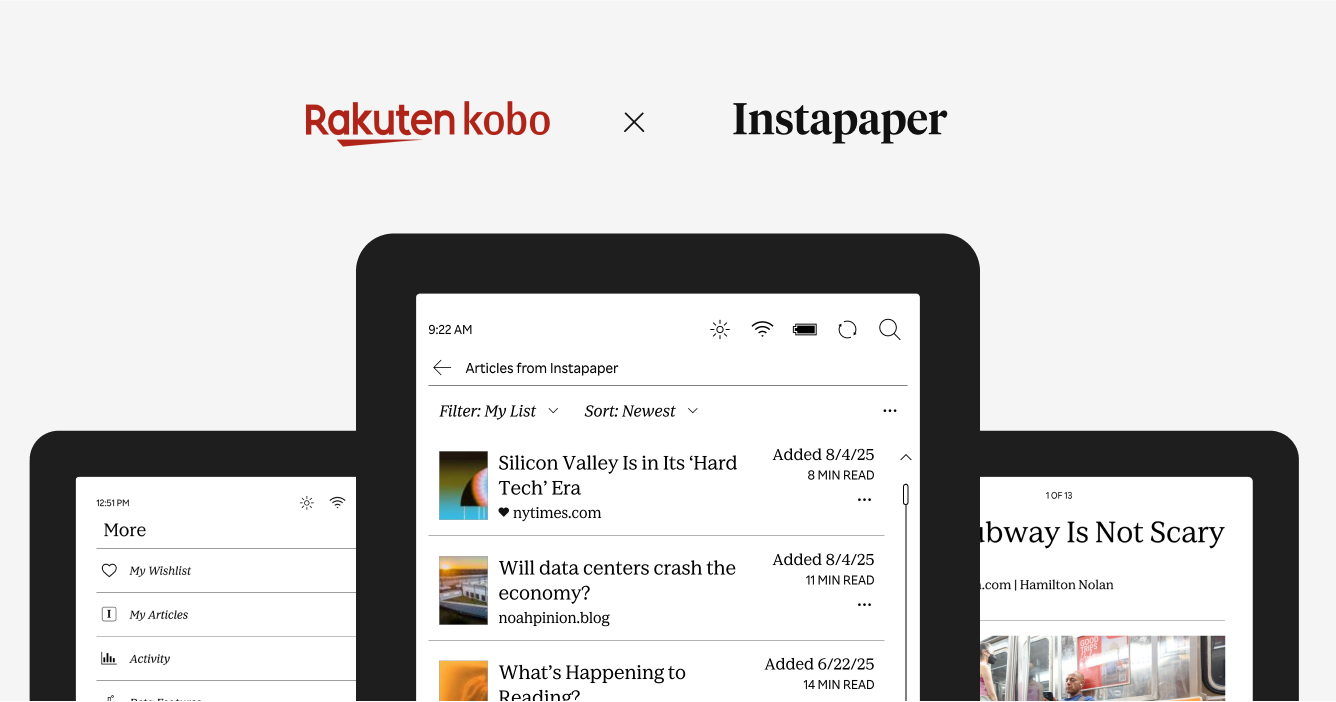
<p>We’re excited to share that Instapaper is now live on all Rakuten Kobo eReaders. Now you can log into Instapaper on your Kobo, download your list of articles, and read them on the go.</p>

<p>To celebrate, in partnership with Kobo, we are giving away 15 Kobo Clara Colour eReaders to Instapaper users. You can enter a chance to win a Kobo eReader at <a href="http://instapaper.com/kobo">instapaper.com/kobo</a>.</p>

<p><strong>About Rakuten Kobo</strong></p>

<p>Rakuten Kobo Inc. is the world’s digital bookseller created by and for booklovers, <a href="https://click.linksynergy.com/fs-bin/click?id=sYIs%2a2Ukl2A&amp;offerid=1562891.1483&amp;type=3&amp;subid=0">providing the best dedicated eReaders</a> and apps for reading. Owned by Tokyo-based Rakuten Group, Inc. and headquartered in Toronto, Rakuten Kobo’s millions of worldwide users can read anytime, anywhere, and on any device. With a mission to make reading lives better for all, Rakuten Kobo connects readers to stories using thoughtful and personalized curation of eBooks and audiobooks. With the singular focus of making reading lives the best they can be, Kobo’s open platform allows people to fit reading into more moments in their busy lives. To learn more about Rakuten Kobo, visit <a href="https://www.kobo.com/">www.kobo.com</a>.</p>

<p><strong>Features</strong></p>

<p>The Kobo integration supports the following features:</p>

<ul>
  <li>Sync your articles with your Instapaper account.</li>
  <li>Access articles offline.</li>
  <li>Like, archive, and delete articles.</li>
  <li>Save articles to your Instapaper account.</li>
</ul>

<p>You can sign in to Instapaper on your Kobo by navigating to More &gt; My Articles.</p>

<p>We know many of you have been asking for an Instapaper integration on Kobo for many years, and we’re excited to launch this integration. As always, if you have any questions, concerns, or requests, you can reach us at <a href="http://instapaper.com/">support@instapaper.com</a>. We look forward to hearing from you!</p>

<p>– Instapaper Team</p>]]></content><author><name></name></author><category term="Announcements" /><summary type="html"><![CDATA[]]></summary><media:thumbnail xmlns:media="http://search.yahoo.com/mrss/" url="/img/kobo-hero.png" /><media:content medium="image" url="/img/kobo-hero.png" xmlns:media="http://search.yahoo.com/mrss/" /></entry><entry><title type="html">PDF Support, Localization, and International Pricing</title><link href="/post/791134578856378368/pdf-support-localization-and-international" rel="alternate" type="text/html" title="PDF Support, Localization, and International Pricing" /><published>2025-08-06T09:52:08+00:00</published><updated>2025-08-06T09:52:08+00:00</updated><id>/post/791134578856378368/pdf-support-localization-and-international</id><content type="html" xml:base="/post/791134578856378368/pdf-support-localization-and-international"><![CDATA[<p><img src="/img/pdf_beta.png" alt="" /></p>

<p>We’re excited to (finally) launch PDF support for Instapaper! Our focus for PDFs is to make them more readable, especially on mobile devices, and bring the suite of Instapaper tools to PDFs including highlighting, notes, text-to-speech, etc.</p>

<p>For years, we’ve been at work building a PDF Parser that is up to our standards for great reading experiences. We’ve really enjoyed reading PDFs on Instapaper, and have received really positive feedback from beta testers.</p>

<p>Given PDFs require additional processing, PDF support will only be available for <a href="https://instapaper.com/premium">Instapaper Premium customers</a>.</p>

<p><strong>Saving PDFs to Instapaper</strong></p>

<p><img src="/img/file-upload.png" alt="" /></p>

<p>We have expanded most of our existing “save” methods to support PDFs. You can save PDFs to Instapaper using any of the following methods:</p>

<ul>
  <li>Use one of our <a href="https://instapaper.com/save">browser extensions</a> to save a PDF from a link on the web.</li>
  <li>Drag &amp; drop a PDF (or several PDFs) to <a href="http://instapaper.com/">instapaper.com</a> in order to save.</li>
  <li>Upload PDFs from iOS, macOS, or Android using new share extensions.</li>
  <li>Attach a PDF to an email and send to your <a href="https://instapaper.com/save/email">Save to Instapaper email address</a>.</li>
</ul>

<p><strong>Localizations</strong></p>

<p>Historically, Instapaper has supported 13 localizations other than English: Dutch, German, French, Italian, Japanese, Korean, Polish, Portuguese, Russian, Spanish, Turkish, Chinese Simplified, and Chinese Traditional.</p>

<p>Our iOS app had only 65% of strings translated, and Android had only 70% of strings translated.</p>

<p>We’ve onboarded a new localization vendor, and we’ve brought those translations up to 99% across iOS and Android. Additionally, we’re working to localize and translate the core app flows on <a href="http://instapaper.com/">instapaper.com</a>.</p>

<p><strong>International Pricing</strong></p>

<p>We’re significantly reducing international pricing in certain markets for Instapaper Premium.</p>

<p>When we first <a href="https://blog.instapaper.com/post/97750859246">launched Instapaper Premium in 2014</a>, we set international pricing automatically on the App Store and Google Play based on the USD price and 2014 conversion rates.</p>

<p>In 2024, when we <a href="https://blog.instapaper.com/post/735784644474208256/permanent-archive-and-premium-price-change">increased the price of Instapaper Premium</a>, we updated the USD price point and used the 2024 conversion rate, which significantly increased the price of Instapaper Premium in some international markets.</p>

<p>That was a mistake. We didn’t appropriately predict how the price change would impact each locale and we apologize.</p>

<p>In order to make things right, we are significantly reducing the price of Instapaper Premium on the App Store and Google Play in the following countries:</p>

<p><img src="/img/international-pricing.png" alt="" /></p>

<p>The new prices will go into effect Thursday August 7th on both iOS App Store and Google Play. On iOS App Store, existing Premium subscriptions will renew at the new price points. On Google Play, new price points are only in effect for new subscriptions, and you can cancel/resubscribe to get the lower rates.</p>

<p>Our goal with Instapaper is to build a long-term, sustainable business that brings the best reading tools to everyone at an affordable price point. The prices above more accurately reflect that intent, and we’re happy to rectify this mistake.</p>

<p>As always, our work is informed by your feature requests and bug reports. Please don’t hesitate to reach out to us at <a href="http://instapaper.com/">support@instapaper.com</a> if you have any feedback!</p>

<p>– Instapaper Team</p>]]></content><author><name></name></author><category term="Pricing" /><summary type="html"><![CDATA[]]></summary><media:thumbnail xmlns:media="http://search.yahoo.com/mrss/" url="/img/pdf_beta.png" /><media:content medium="image" url="/img/pdf_beta.png" xmlns:media="http://search.yahoo.com/mrss/" /></entry><entry><title type="html">Instapaper Rakuten Kobo Integration</title><link href="/post/789685899750424576/instapaper-rakuten-kobo-integration" rel="alternate" type="text/html" title="Instapaper Rakuten Kobo Integration" /><published>2025-07-21T10:06:00+00:00</published><updated>2025-07-21T10:06:00+00:00</updated><id>/post/789685899750424576/instapaper-rakuten-kobo-integration</id><content type="html" xml:base="/post/789685899750424576/instapaper-rakuten-kobo-integration"><![CDATA[<p><img src="/img/instapaper-kobo.png" alt="" /></p>

<p>We’re excited to announce a new integration that will bring Instapaper to all <a href="https://click.linksynergy.com/fs-bin/click?id=sYIs%2a2Ukl2A&amp;offerid=1562891.1483&amp;type=3&amp;subid=0">Rakuten Kobo eReaders</a>. The integration will provide Kobo readers with a seamless way to save and read web articles directly on their Kobo eReaders.</p>

<p>In close partnership with Kobo, we’re working diligently on the integration, and we’re aiming to launch at the end of this summer. The new Kobo Instapaper integration will replace Kobo’s previous integration with Pocket which shut down earlier this month.</p>

<p>Since the Pocket shutdown, our top priority has been to help Pocket users migrate to Instapaper. Pocket users who have made the switch praise Instapaper on its clean, distraction-free reading experience, and robust organization tools.</p>

<p>We’re excited to be partnered closely with Rakuten Kobo to power the read-it-later functionality on their Kobo eReader devices!</p>

<p><strong>Importing from Pocket</strong></p>

<p><img src="/img/instapaper-pocket.png" alt="" /></p>

<p>If you’re a former Pocket user, you can import your articles into Instapaper in 2-clicks at <a href="http://instapaper.com/pocket">instapaper.com/pocket</a>.</p>

<p>Alternatively, you can <a href="https://getpocket.com/export">download your Pocket export file</a> and import to <a href="https://www.instapaper.com/user">Instapaper Settings</a>.</p>

<p>As always, if you have any questions, concerns, or requests, you can reach us at <a href="http://instapaper.com/">support@instapaper.com</a>. We look forward to hearing from you!</p>

<p>– Instapaper Team</p>]]></content><author><name></name></author><category term="Announcements" /><summary type="html"><![CDATA[]]></summary><media:thumbnail xmlns:media="http://search.yahoo.com/mrss/" url="/img/instapaper-kobo.png" /><media:content medium="image" url="/img/instapaper-kobo.png" xmlns:media="http://search.yahoo.com/mrss/" /></entry><entry><title type="html">PDF Beta, TTS Fixes on iOS, and Logged-In Sites on Android</title><link href="/post/781539710965301248/pdf-beta-tts-fixes-on-ios-and-logged-in-sites-on" rel="alternate" type="text/html" title="PDF Beta, TTS Fixes on iOS, and Logged-In Sites on Android" /><published>2025-04-22T12:05:49+00:00</published><updated>2025-04-22T12:05:49+00:00</updated><id>/post/781539710965301248/pdf-beta-tts-fixes-on-ios-and-logged-in-sites-on</id><content type="html" xml:base="/post/781539710965301248/pdf-beta-tts-fixes-on-ios-and-logged-in-sites-on"><![CDATA[<p>Today, we’re launching a few updates to Instapaper including a public beta for PDFs, text-to-speech fixes on iOS, and support for Logged-In Sites on Android.</p>

<h2 id="pdf-beta"><strong>PDF Beta</strong></h2>

<p><img src="/img/pdf_beta.png" alt="" /></p>

<p>For years, we’ve been at work building a PDF Parser that is up to our standards for great reading experiences. Now that we’re closing in on a PDF Parser that focuses on delivering the best reading experience for PDFs, especially on mobile devices, we’re ready to onboard beta testers so we can continue refining the experience.</p>

<p>If you’re interested in joining the PDF Beta, please send an email to <a href="http://instapaper.com/">support@instapaper.com</a> from your Instapaper login email (or include it in the email). We’re going to add the first 100 people that reach out to the beta, and we’ll send you the instructions to get started in a reply.</p>

<p>We’re really excited about our new PDF Parser. It’s one of the biggest leaps we’ve made with Instapaper recently, and we look forward to hearing your feedback!</p>

<h2 id="ios-92-text-to-speech-fixes"><strong>iOS 9.2: Text-to-Speech Fixes</strong></h2>

<p>We rewrote Instapaper’s text-to-speech integration to fix some longstanding issues where the voice skipped or restarted, especially on larger articles. In our testing, this resolved issues across many of the provided voices on iOS, and we’ve received a lot of positive feedback from testers.</p>

<p>We’re working on more improvements to Text-to-Speech on Instapaper, including fixing issues with wireless CarPlay, adding more text-to-speech voices, and re-writing the interface for text-to-speech. If you’re interested in helping to beta test any of those, please reach out to <a href="http://instapaper.com/">support@instapaper.com</a> and we’ll let you know when it’s ready!</p>

<h2 id="android-62-logged-in-sites-support"><strong>Android 6.2: Logged-In Sites Support</strong></h2>

<p><img src="/img/android_loggedin_sites.png" alt="" /></p>

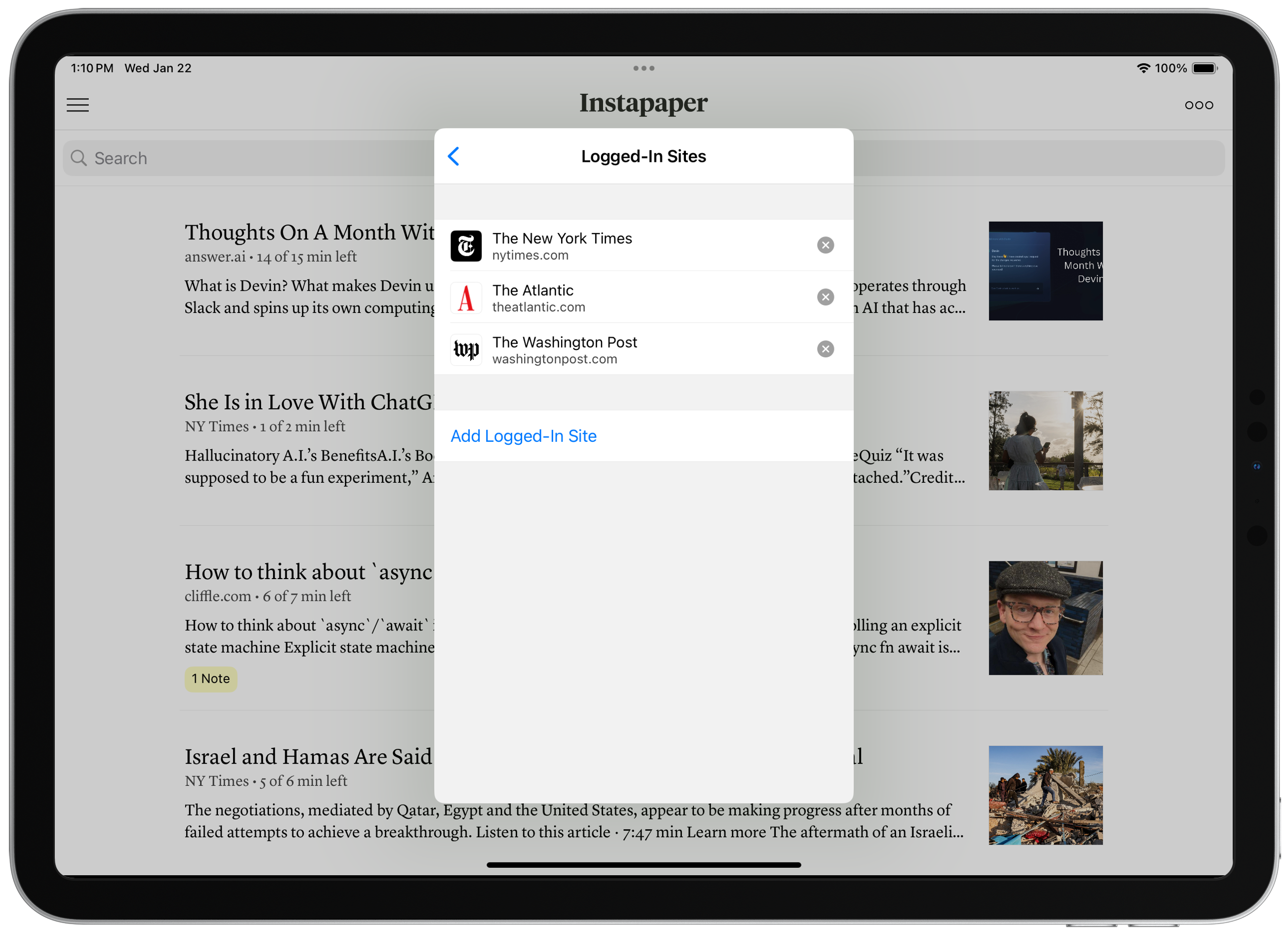
<p>On Instapaper Android, you can now sign in to websites directly within the app. When you’re logged into sites, Instapaper can more reliably retrieve and display complete articles, especially for websites with paywalls. You can learn more on the <a href="https://blog.instapaper.com/post/774564490310205440/instapaper-ios-91-logged-in-sites-paywall">Logged-In Sites Launch Post</a>.</p>

<p>To get started, navigate to Settings &gt; Logged-In Sites &gt; Navigate to website &gt; Login with your credentials &gt; Tap “Save Login”.</p>

<p>As always, our work is informed by your feature requests and bug reports. Please don’t hesitate to reach out to us at <a href="http://instapaper.com/">support@instapaper.com</a> if you have any feedback!</p>

<p>– Instapaper Team</p>]]></content><author><name></name></author><category term="Features" /><summary type="html"><![CDATA[Today, we’re launching a few updates to Instapaper including a public beta for PDFs, text-to-speech fixes on iOS, and support for Logged-In Sites on Android.]]></summary><media:thumbnail xmlns:media="http://search.yahoo.com/mrss/" url="/img/pdf_beta.png" /><media:content medium="image" url="/img/pdf_beta.png" xmlns:media="http://search.yahoo.com/mrss/" /></entry><entry><title type="html">Instapaper 9.1: Logged-In Sites, Paywall Detection, and Settings Redesign</title><link href="/post/774564490310205440/instapaper-ios-91-logged-in-sites-paywall" rel="alternate" type="text/html" title="Instapaper 9.1: Logged-In Sites, Paywall Detection, and Settings Redesign" /><published>2025-02-04T12:17:40+00:00</published><updated>2025-02-04T12:17:40+00:00</updated><id>/post/774564490310205440/instapaper-ios-91-logged-in-sites-paywall</id><content type="html" xml:base="/post/774564490310205440/instapaper-ios-91-logged-in-sites-paywall"><![CDATA[<p>Today, we’re launching Instapaper 9.1 for iOS and macOS, which includes support for Logged-In Sites, Paywall Detection, Settings Redesign, and more.</p>

<p><strong>Logged-In Sites</strong></p>

<p><img src="/img/logged_in_sites.png" alt="" /></p>

<p>On Instapaper iOS and macOS, you can now sign in to websites directly within the app. When you’re logged into sites, Instapaper can more reliably retrieve and display complete articles.</p>

<p>Increasingly, we’re seeing more “hard paywalls” across the Internet, where publishers are preventing third parties from accessing content. Sometimes, this results in Instapaper only receiving part of an article and, other times, Instapaper is completely blocked from accessing any information including basic metadata (i.e. title, author, image thumbnail, etc.).</p>

<p>We support publishers in serving their content however they’d like. That said, paid subscribers of those publishers should be able to access that content in whichever browsers, apps, or user-agents they’d like. </p>

<p>To get started, navigate to Settings &gt; Logged-In Sites &gt; Navigate to website &gt; Login with your credentials &gt; Tap “Save Login”.</p>

<p>As a reminder, you can long press an article in the list to redownload it, or save new articles to get the full content.</p>

<p><strong>Paywall Detection</strong></p>

<p><img src="/img/paywall_notice.png" alt="" /></p>

<p>Our article parsers now detect paywalls and provide instructions for accessing the complete content when you have a subscription.</p>

<p>On iOS and macOS, you can use Logged-In Sites in order to access the paywalled content, and we prompt you to login to the website directly from the paywall notice.</p>

<p>On <a href="https://www.instapaper.com/">Instapaper.com</a>, the best way to access the full content for a paywalled site is to open the article, ensure you’re logged in to the website, and use one of our <a href="https://www.instapaper.com/save">browser extensions</a> to save the article.</p>

<p><strong>Settings Redesign</strong></p>

<p><img src="/img/settings_redesign.png" alt="" /></p>

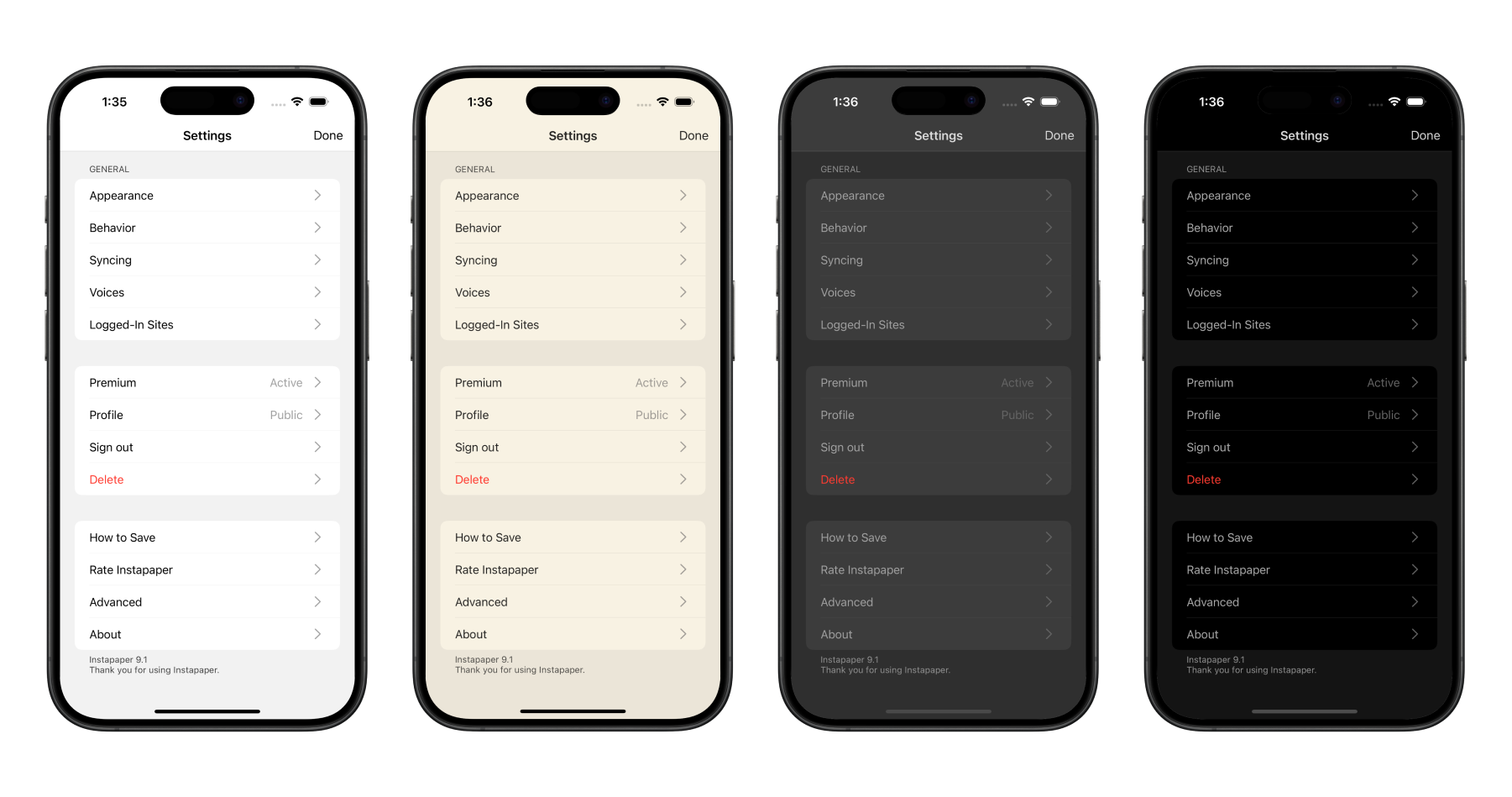
<p>We re-wrote Settings on iOS and macOS to conform to the app theme, improve the organization of Settings pages, and make it easier for our team to add and manage Settings.</p>

<p>We also added three new settings in Settings &gt; Behavior to customize Instapaper further:</p>

<ol>
  <li><strong>Save Delay:</strong> Adjusts the amount of time that the Save screen shows. You can set this to “None” to have it disappear as quickly as possible.</li>
  <li><strong>Auto-Lock:</strong> Prevents your screen from locking in reader when disabled.</li>
  <li><strong>Line Breaks in Code:</strong> Prevents line breaks in code blocks when disabled.</li>
</ol>

<p><strong>Other Improvements</strong></p>

<p>We’re also launching a number of other fixes and improvements, including…</p>

<ul>
  <li>Fixed issue where article information was not showing on lock screen when using text-to-speech Playlists.</li>
  <li>Improved Full Screen Image Viewer on all platforms, but big improvements to iPad and macOS.</li>
  <li>Improvements to device rotation on iPad, and reduced crashing.</li>
  <li>Other minor fixes and improvements.</li>
</ul>

<p>We’re in the process of building Logged-In Sites support on Android, if you’d like to help beta test please drop us an email at <a href="http://instapaper.com/">support@instapaper.com</a></p>

<p>As always, our roadmap is informed by your feature requests and bug reports. Please don’t hesitate to reach out to <a href="http://instapaper.com/">support@instapaper.com</a> with any requests, questions, or concerns.</p>

<p>– Instapaper Team</p>]]></content><author><name></name></author><category term="Features" /><summary type="html"><![CDATA[Today, we’re launching Instapaper 9.1 for iOS and macOS, which includes support for Logged-In Sites, Paywall Detection, Settings Redesign, and more.]]></summary><media:thumbnail xmlns:media="http://search.yahoo.com/mrss/" url="/img/logged_in_sites.png" /><media:content medium="image" url="/img/logged_in_sites.png" xmlns:media="http://search.yahoo.com/mrss/" /></entry><entry><title type="html">Instapaper Android 6.1: View Notes, Multiselect Tagging, and More!</title><link href="/post/772844182708568064/instapaper-android-61-view-notes-multiselect" rel="alternate" type="text/html" title="Instapaper Android 6.1: View Notes, Multiselect Tagging, and More!" /><published>2025-01-16T12:34:07+00:00</published><updated>2025-01-16T12:34:07+00:00</updated><id>/post/772844182708568064/instapaper-android-61-view-notes-multiselect</id><content type="html" xml:base="/post/772844182708568064/instapaper-android-61-view-notes-multiselect"><![CDATA[<p>Happy new year! Today we’re excited to launch <a href="https://play.google.com/store/apps/details?id=com.instapaper.android&amp;hl=en_US&amp;pli=1">Instapaper Android 6.1</a>, which includes View Notes to make it easy to view an article’s notes in one place, multiselect tagging for better bulk organizing of your articles with tags, and a few more features and improvements.</p>

<p><strong>View Notes</strong></p>

<p><img src="/img/android-6-1-view-notes.png" alt="" /></p>

<p>Easily view your highlights and notes on an article by tapping the Notes button in the article list, or by opening an article, tapping the more button, and tap “View Notes”.</p>

<p>From there, you can easily export your notes on an article in plain text, markdown, or HTML. Additionally, you can easily navigate to each note within the article.</p>

<p><strong>Multiselect Tagging</strong></p>

<p><img src="/img/android-6-1-multiselect.png" alt="" /></p>

<p>We added multiselect tagging in Instapaper Android 6.1 to make it much easier to organize your articles with tags in bulk. You can start multiselect by long pressing an article, select the articles you want to add tags to, and then tap the tag icon.</p>

<p><strong>Other Features &amp; Improvements</strong></p>

<p>In addition to the above, Instapaper Android 6.1 has a handful of additional features and improvements:</p>

<ul>
  <li>Added <a href="https://opendyslexic.org/">OpenDyslexic</a> font for readers with dyslexia.</li>
  <li>Improved experience for e-ink readers by disabling more animations.</li>
  <li>Fixed bug where screen would not lock with reader open.</li>
  <li>Fixed issue where video thumbnails would show up duplicated.</li>
  <li>Other minor crash fixes and improvements.</li>
</ul>

<p>We’re excited to continue improving the Android app, and getting it up to parity with iOS and web. Please let us know if you have any feature requests, bug reports, or improvements you’d like to see on Android!</p>

<p>– Instapaper Team</p>]]></content><author><name></name></author><category term="Features" /><summary type="html"><![CDATA[Happy new year! Today we’re excited to launch Instapaper Android 6.1, which includes View Notes to make it easy to view an article’s notes in one place, multiselect tagging for better bulk organizing of your articles with tags, and a few more features and improvements.]]></summary><media:thumbnail xmlns:media="http://search.yahoo.com/mrss/" url="/img/android-6-1-view-notes.png" /><media:content medium="image" url="/img/android-6-1-view-notes.png" xmlns:media="http://search.yahoo.com/mrss/" /></entry><entry><title type="html">Introducing Tags for Better Organization</title><link href="/post/765771980408569856/tags" rel="alternate" type="text/html" title="Introducing Tags for Better Organization" /><published>2024-10-30T11:04:29+00:00</published><updated>2024-10-30T11:04:29+00:00</updated><id>/post/765771980408569856/tags</id><content type="html" xml:base="/post/765771980408569856/tags"><![CDATA[<p><img src="/img/tagnocontent.png" alt="" /></p>

<p>We’re excited to announce that Tags are now live on all platforms—iOS, macOS, Android, Web, and Browser Extensions!</p>

<p>Tags offer more flexibility than folders when it comes to organizing your articles. With tags, you can assign multiple labels to a single article, making it easier to find exactly what you’re looking for later. Additionally, archived articles retain their tags, keeping everything organized long-term.</p>

<p>Both  <strong>Folders</strong>  and  <strong>Tags</strong>  will continue to be supported in Instapaper. We’ve already seen beta testers reorganize folders into top-level topics and use tags to organize within folders.</p>

<p>To make the migration to tags easy, we’ve added a feature to convert your folders into tags. Just go to <a href="http://instapaper.com/">instapaper.com</a>, navigate to the folder, select  <strong>Edit</strong> , and click  <strong>Convert to Tag</strong>.</p>

<p>Tags are completely free to use!  If you’d like to support Instapaper and unlock additional features, consider subscribing to <a href="https://instapaper.com/premium"><strong>Instapaper Premium</strong></a>.</p>

<p><strong>Saving Improvements</strong></p>

<p><img src="/img/tags_saving.png" alt="" /></p>

<p>On all platforms, Instapaper supports saving articles with tags, organizing into folders, or moving saved articles directly to archive.</p>

<p><strong>Tag Search</strong></p>

<p><img src="/img/tags_search.png" alt="" /></p>

<p>With <a href="https://www.instapaper.com/premium">Instapaper Premium</a>, you can now search your articles by tags using the # symbol (e.g. <em>#science</em> will filter articles with the science tag). You can also search articles using multiple tags (e.g. <em>#science #physics</em>), and use full-text search terms alongside your tag filters (e.g. <em>gravity #science #physics</em>).</p>

<p><strong>Importing Tags from other Services</strong></p>

<p>When you import tagged articles from another service, Instapaper will automatically import those tags and add them to your articles.</p>

<p>Through the end of November, we’re offering a 2-month free trial for Instapaper Premium when you import from another service at <a href="http://instapaper.com/user">instapaper.com/user</a>.</p>

<p><strong>Additional Features</strong></p>

<p>This round of updates also includes the following features:</p>

<ul>
  <li>From an article list, view your Notes on any article with one tap.</li>
  <li>Multi-select tagging is supported on iOS and web, making bulk organization easier. Android support coming soon!</li>
  <li>Export your tagged articles via RSS, PDF, or ePub on instapaper.com. Navigate to the tag &gt; Tap your username on top right &gt; Download.</li>
  <li><a href="https://ifttt.com/instapaper/details">IFTTT channel</a> updates include a new trigger when a tag is added to an article, and an improved save action that can save an article with multiple tags.</li>
  <li><a href="https://obsidian.md/plugins?search=instapaper">Obsidian plugin</a> syncs article tags on imported highlights and notes.</li>
</ul>

<p><strong>One More Thing: Multicolumn Support on iPad</strong></p>

<p><img src="/img/multicolumn.png" alt="" /></p>

<p>Multi-column support is being piloted in Instapaper 9 for iOS. Multicolumn layout is a great way to take advantage of the entire screen for reading on your iPad. You can enable it by navigating to text settings &gt; Swipe Left &gt; Multi-column (ON).</p>

<p>The team has been using it and really enjoying it! Based on feedback, we will explore launching it on Android tablet and instapaper.com.</p>

<p><strong>Next Up</strong></p>

<p>Over the next weeks &amp; months, we’ll be focused on more core improvements to Instapaper, including…</p>

<ul>
  <li>Parsing improvements, including for paywalled content.</li>
  <li>Advanced text-to-speech voices.</li>
  <li>Support for more types of content within Instapaper.</li>
</ul>

<p>As always, our work is informed by your feature requests and feedback. Please drop us a message at <a href="http://instapaper.com/">support@instapaper.com</a> with any feedback, or if you’re interested in beta testing the features above.</p>

<p>– Instapaper Team</p>]]></content><author><name></name></author><category term="Features" /><summary type="html"><![CDATA[]]></summary><media:thumbnail xmlns:media="http://search.yahoo.com/mrss/" url="/img/tagnocontent.png" /><media:content medium="image" url="/img/tagnocontent.png" xmlns:media="http://search.yahoo.com/mrss/" /></entry><entry><title type="html">Bringing Highlights to the Open Web</title><link href="/post/752995536017178624/bringing-highlights-to-the-open-web" rel="alternate" type="text/html" title="Bringing Highlights to the Open Web" /><published>2024-06-11T10:28:23+00:00</published><updated>2024-06-11T10:28:23+00:00</updated><id>/post/752995536017178624/bringing-highlights-to-the-open-web</id><content type="html" xml:base="/post/752995536017178624/bringing-highlights-to-the-open-web"><![CDATA[<p><img src="/img/extension_highlights1.png" alt="" /></p>

<p>Today we’re launching updates to our extensions for <a href="https://chromewebstore.google.com/detail/instapaper/ldjkgaaoikpmhmkelcgkgacicjfbofhh?hl=en">Chrome</a> (including Arc/Edge), <a href="https://addons.mozilla.org/en-US/firefox/addon/instapaper-official/">Firefox</a>, and <a href="https://apps.apple.com/us/app/instapaper/id288545208">Safari.</a> These updates bring support for highlights on the open web, archiving articles after saving, and Send to Kindle.</p>

<p><strong>Highlights</strong></p>

<p>With the updated Instapaper browser extensions, you can easily create highlights on any web page in a few different ways:</p>

<ul>
  <li>Select text and save the article.</li>
  <li>After saving an article, any time you select text a small popover will appear with buttons to create a highlight or note.</li>
  <li>After saving an article, you can create a Quick Highlight by holding Alt or Option and selecting text.</li>
</ul>

<p><img src="/img/extension_highlights2.png" alt="" /></p>

<p>Your highlights will only be available on the page during that session, are not stored locally in the browser, and will not appear on a refresh. However, when you press the Instapaper button again it will bring all of your highlights back onto the page.</p>

<p>With these updates, pressing the Instapaper button is not only for saving the article, but bringing your highlights, notes, and Instapaper tools directly to the webpage itself.</p>

<p>We built these features to be discreet, however, you can also disable each feature in the extension settings:</p>

<ul>
  <li><strong>Chrome:</strong> Right-click Instapaper extension &gt; Options.</li>
  <li><strong>Firefox:</strong> Right-click Instapaper add-on &gt; Manage Extension &gt; Preferences.</li>
  <li><strong>Safari:</strong> Instapaper macOS App Settings &gt; Safari Extension.</li>
</ul>

<p><img src="/img/extension_options.png" alt="" /></p>

<p><strong>Archive after Save</strong></p>

<p>We received many feature requests for archiving immediately after saving. We’ve added an archive button to the toolbar that makes it easy to quickly archive after saving.</p>

<p><strong>Send to Kindle</strong></p>

<p>With this update, we’re also bringing support for Send to Kindle directly in the browser extensions. It’s available for <a href="https://instapaper.com/premium">Instapaper Premium</a> customers that have a Kindle email address configured in <a href="https://instapaper.com/user">Instapaper Settings</a>.</p>

<p>We recommend migrating Send to Kindle to the browser extensions, however, we will continue to maintain support for the Send to Kindle bookmarklet as well.</p>

<p>Send to Kindle can also be disabled in the extension options page.</p>

<p><strong>Firefox Add-On</strong></p>

<p>Earlier this year, Instapaper was removed from the Firefox Add-On store after attempting a small update to fix saving YouTube videos. After being removed and several subsequent rejections, we decided to self-distribute our Firefox Add-On.</p>

<p>We’re happy to share that we were able to work with Mozilla to resolve the issue, and Instapaper is now available on the <a href="https://addons.mozilla.org/en-US/firefox/addon/instapaper-official/">Firefox Add-On store</a> again. That said, given the situation we will be continuing to support the <a href="https://addons.mozilla.org/en-US/firefox/addon/instapaper-official/">Firefox Add-On store</a> and <a href="https://staticinstapaper.s3.us-west-2.amazonaws.com/files/instapaper-firefox-3-0-3.xpi">self-distribution of our Add-On</a>.</p>

<p>In either case, your Add-On should automatically update as long as you’re using Firefox version 109 (January 2023) or later.</p>

<p><strong>Safari Extension</strong></p>

<p>For historical reasons, we previously distributed our Safari Extension with the <a href="https://apps.apple.com/us/app/instapaper-save/id1481302432?mt=12">Instapaper Save app</a>. We’re happy to share that the new Safari Extension is now available with the main <a href="https://apps.apple.com/us/app/instapaper/id288545208">Instapaper macOS app</a>.</p>

<p>We recommend migrating to the new Safari Settings by doing the following:</p>

<ul>
  <li>Update <a href="https://apps.apple.com/us/app/instapaper/id288545208">Instapaper macOS</a> to version 8.6.2.</li>
  <li>Open Safari Settings &gt; Extensions</li>
  <li>Enable new Instapaper extension (icon with rounded corners).</li>
  <li>Disable old Instapaper Extension (icon with square corners).</li>
</ul>

<p><img src="/img/safari_extension_page.png" alt="" /></p>

<p>Instapaper macOS 8.6.2 also ships with an updated Mac Share Extension that is improved from the Instapaper Save app (e.g. saving from Apple News now works properly).</p>

<p>With this update the Instapaper Save app is now deprecated. We plan to remove it from the App Store in the coming weeks. After you successfully migrate, you can delete the Instapaper Save app from your Mac.</p>

<p><strong>Other Minor Fixes &amp; Improvements</strong></p>

<p>In this release, we’re also shipping a number of other minor fixes and improvements:</p>

<ul>
  <li>Fix inline Twitter saving on x.com domain.</li>
  <li>Fix for saving Hacker News threads on Firefox.</li>
  <li>Lobste.rs inline saving support.</li>
</ul>

<p>As always, our roadmap is directly informed by your feature requests and bug reports. Please reach out to us at <a href="http://instapaper.com">support@instapaper.com.</a></p>

<p>– Instapaper Team</p>]]></content><author><name></name></author><category term="Features" /><summary type="html"><![CDATA[]]></summary><media:thumbnail xmlns:media="http://search.yahoo.com/mrss/" url="/img/extension_highlights1.png" /><media:content medium="image" url="/img/extension_highlights1.png" xmlns:media="http://search.yahoo.com/mrss/" /></entry></feed>