Instapaper is now optimized for iOS 11
Today we’re launching our iOS 11-tailored update with drag and drop support for iPad and iPad Pro as well as performance improvements for Instapaper across all iOS devices.
Drop to save
https://player.vimeo.com/video/234592989
iOS 11 makes saving articles and videos to Instapaper more seamless. To save from another app, first multitask Instapaper using Slide Over or Split View. From there, long-press on a link in another app, such as Safari, and drag it into Instapaper to save it. If you drag a link into an open folder, it will save directly to that folder.
Drag into other apps
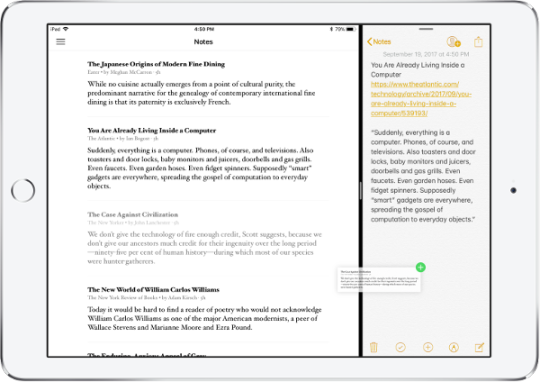
It’s now easier to share articles from your Instapaper account to other apps. Just long-press on an article entry and drop it into a compatible app, like Mail or a browser. Dragging from Instapaper also works from search results, so it’s simple to find and share anything in your account, regardless of whether it’s synced to your device. Article highlights and notes can be shared by dragging from the Notes section.
iOS 11 Password AutoFill
We added support for iOS 11’s new Password AutoFill feature. If your Instapaper credentials are stored in your iCloud Keychain, you’ll now see the option to use your saved password above the keyboard when logging in on iOS.
Bug fixes
This update addresses a variety of user-reported issues from the last release. We’ve improved our handling of embedded video content, particularly for poor connection scenarios, to ensure better and faster opening of saves in all conditions.
We also fixed a recent issue where exiting an article with a swipe gesture could result in your current reading position not saving.
Lastly, we made several search UI improvements, including a fix for a small line that would occasionally appear across the search tab.
We hope these updates make reading, sharing and multitasking with Instapaper better than ever.
If you’ve got any questions or feedback, just let us know via support@help.instapaper.com or @InstapaperHelp on Twitter.