Instapaper iOS 7.7: iPad Pro, Smart Keyboard, and True Black
Instapaper 7.7 is now live in the iOS App Store with support for iPad Pro, Smart Keyboard shortcuts, and a True Black theme for iPhone X devices.
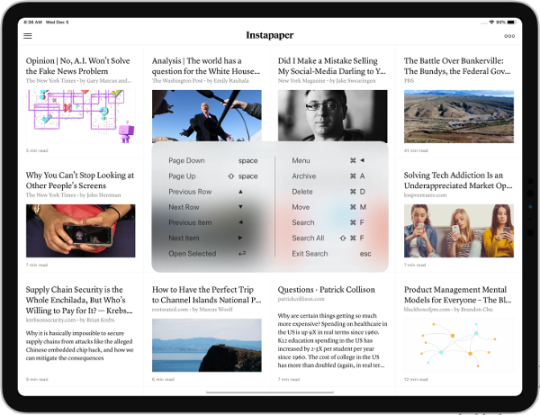
For Smart Keyboards, Instapaper now supports the following shortcuts:
- ▲ and ▼ to navigate through articles in list view, ◀ and ▶ to navigate through articles in grid view
- ↩ to open article from list
- ⌘+A to archive an article
- ⌘+M to move an article
- ⌘+D to delete an article
- ⌘+◀ to navigate back
- ⌘+F to perform a local, title-based search
- ⌘+⇧+ F to trigger full-text search for Premium users
- Esc to leave search
- Space and ⇧+space to page up and down in list or from inside article
In case you forget, holding ⌘ will bring up the list of shortcuts available on the current screen.
It took a considerable amount of work to get basic navigational support for Smart Keyboards, so we created an open source library called IPShortcut that provides Smart Keyboard shortcuts for table views, collection views, and scroll views.
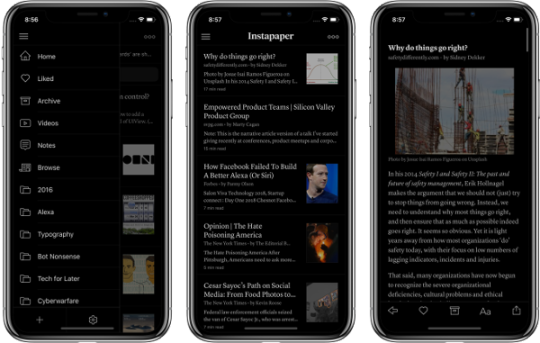
The new True Black theme takes advantage of the OLED screens for iPhone X, iPhone XS, and iPhone XS Max to offer an even better experience when reading in dark mode. Screens on these devices display black by turning those pixels off on the screen, which is particularly great for reading at night. To get started, just switch to the dark mode theme on one of these devices.
If you have any questions, feature requests, or issues you’d like us to sort out, please let us know at support@instapaper.com or @InstapaperHelp on Twitter. We love hearing from you and we thank you for using Instapaper!
- Instapaper Team